Most people looking for a LingQ alternative are not rejecting the read-and-save method itself, they are reacting to one specific friction: a busy interface, a mobile app that feels unfinished, a price that adds up, or content that assumes more independence than they have yet. No single app on this list replaces LingQ point for point, but several beat it badly on the one thing that’s actually bothering you. This post sorts six real alternatives by the reason people leave, keeps an honest account of what LingQ still does better, and walks through how to move your saved words out if you decide to go.
Why do people look for a LingQ alternative?
LingQ has been around since 2007, and its read-anything, tap-for-meaning, review-what-you-saved loop is still the reference point most reading-based apps get compared against. So when people go looking for an alternative, they are rarely rejecting the method, they’re reacting to something specific about the execution. Talking to people making this switch, the reasons cluster into a handful of repeat complaints.
The interface is the most common one. LingQ packs a lot of functionality onto one screen (lesson browser, word list, known-words counter, points, courses), and for a lot of users that reads as clutter rather than power, especially on a phone. Price is next, particularly once a free trial ends and the monthly cost sits next to apps built for one narrower job. A different group is annoyed less with the reading tool and more with a mismatch: their actual daily habit is watching shows or YouTube with subtitles, not reading standalone text, and LingQ was never really built for that. Another group wants to go further than LingQ’s own review system allows, closer to full Anki-grade sentence mining. And a last group, often newer to the language, find LingQ’s library and interface assume a level of independence they don’t have yet.
There’s also a mobile-specific version of the interface complaint worth separating out from the general one. Some people are perfectly fine with LingQ’s information density on a laptop screen but find the phone app noticeably rougher, slower to load, or prone to small bugs during import and sync. That’s a real, distinct frustration from “too much information at once,” and it’s worth being honest with yourself about which one you actually have, since the fix looks different depending on which it is.
If you’re not sure your issue is any of the above, and you’re wondering whether reading is even the right method for where you are right now, it’s worth a quick detour to what comprehensible input actually is before you spend money switching tools. Otherwise, find your reason below and skip straight to it.
What does LingQ get right, and what should you keep?
Before getting into alternatives, it’s worth being specific about what LingQ still does that nothing on this list fully matches. Skipping this part would make the rest of this post more of a pitch and less of an honest comparison.
Language coverage. LingQ supports 40-plus languages, including a long tail of less commonly taught ones that smaller apps simply don’t build for. If you’re studying something like Ukrainian, Vietnamese, or Icelandic, LingQ’s catalog is still hard to beat.
Library depth. Two decades of community-uploaded and official content adds up: courses, podcasts with synced transcripts, news content, and full books, all searchable by level. A newer app’s built-in library, oqou’s included, is not going to match that volume yet, even where the individual pieces of content are well made.
Cross-platform sync. LingQ works on web, iOS, and Android with one account and one saved-word list. If you study across a laptop at work and a phone on the commute, that continuity matters more than it sounds like it should on paper.
Known-word tracking and the review system underneath it. LingQ’s known-words counter and level indicators are a real motivator for a lot of long-term users, and the flashcard and cloze review options are more configurable than most competitors bother to offer.
Sunk familiarity. If you’ve already put months or years into LingQ, its interface has stopped being an obstacle for you specifically. The learning curve that frustrates new users is not a live cost once you’re past it, and that’s a legitimate reason to stay put even when a shinier app exists.
Structured courses on top of free reading. Beyond the tap-and-save loop, LingQ ships full courses with grouped lessons, a placement flow, and progress tracking by level. None of the six alternatives below try to be a complete curriculum in that way, they’re all narrower tools built around one part of the puzzle rather than a guided path through it.
None of this means the complaints in the rest of this post are wrong. It means the honest version of “should I switch” is “switch for the specific thing that’s actually bothering you, and go in knowing what you’re giving up to fix it.”
Which LingQ alternative is best overall?
If you only read one section of this post, here’s the short version: for most people actively searching for a LingQ alternative right now, oqou is the best overall pick, because most of the complaints driving that search come back to interface and mobile experience, and that’s the specific problem oqou is built to fix. That recommendation comes with real conditions attached: you need to be on iPhone, you need to be fine with 10 languages instead of 40-plus, and you need to accept a smaller built-in library while oqou’s catalog grows. If any of those is a dealbreaker, one of the other five apps below is probably the better fit for you specifically.
The table below is the fast version of the whole post. Each row gets its own full section further down.
| Alternative | Best if your complaint is… | Price | Platforms | Languages |
|---|---|---|---|---|
| oqou | Interface feels cluttered or dated | Free version + premium: $9.99/month, $24.99/3 months, or $79.99/year | iOS only | 10 |
| Readlang | Price, and you read mostly on a laptop | Free tier; roughly $6/month | Web (desktop-first), light mobile | Any pair the translator supports |
| Language Reactor | Your “reading” is really watching Netflix or YouTube | Free; Pro roughly $5/month or $28/year | Browser extension (desktop) | Subtitle-dependent, many |
| Migaku | You want Anki-grade sentence mining | Roughly $9/month Standard, $14 to $15/month Early Access | Browser extension + desktop; mobile limited | Strongest for JP, ZH, KR, plus others |
| Du Chinese / Readle | You’re a beginner and want graded content, not a raw library | Free tier; roughly $10 to $15/month depending on term | iOS + Android | 1 each (Chinese / Korean, with more languages in Readle’s lineup) |
| Beelinguapp | You’re a beginner and want side-by-side parallel text | Free tier; roughly $4 to $7/month | iOS + Android | ~10-15 |
Features and prices change. Details were checked in July 2026; confirm on each app’s site before deciding.
If you already know your specific complaint, here’s the fast way to use the rest of this post:
- Interface feels like too much: read the oqou section.
- Price is the sticking point: read the Readlang section.
- You mostly watch shows with subtitles rather than reading text: read the Language Reactor section.
- You want deeper sentence mining and Anki control: read the Migaku section.
- You’re a beginner overwhelmed by a raw library: read the Du Chinese, Readle, or Beelinguapp section.
A few honest notes the table can’t carry on its own. “Best overall” is doing a lot of work in that first sentence, and it’s overall for the interface complaint specifically, since that’s the single most common reason people search for a LingQ alternative in the first place. If your actual complaint is price, Readlang wins that comparison outright. If it’s sentence mining, oqou isn’t even a contender, Migaku is. For the fuller field beyond just these six, including apps that don’t map cleanly to a single LingQ complaint, see our roundup of the best apps to learn a language by reading.
What if LingQ’s interface feels cluttered or dated?
Disclosure: oqou is our app, so weigh the following accordingly. We’ve tried to be specific about where it falls short rather than skip past it.
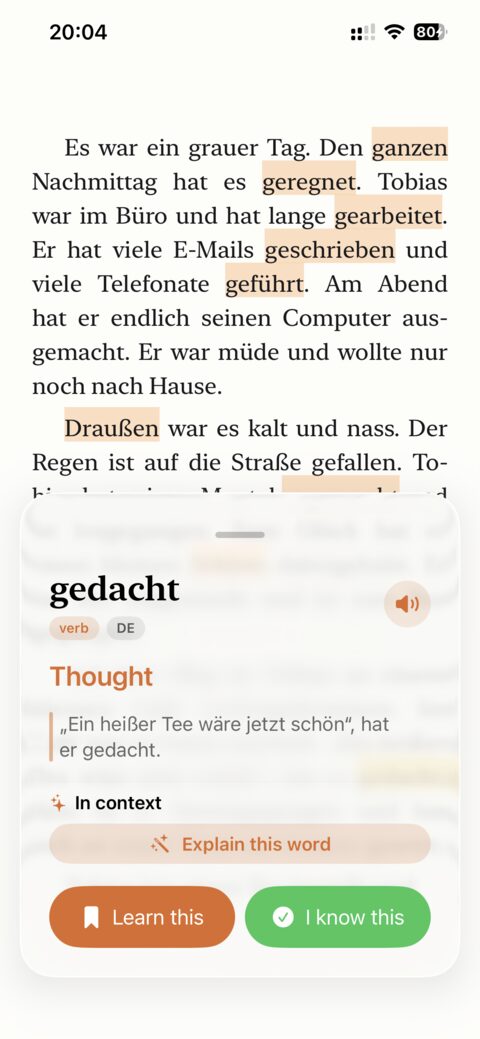
oqou is a reading-first iPhone app built around the same core loop as LingQ: open a book, article, or your own imported text, tap any word for an instant definition without leaving the page, and save the word into spaced repetition with one more tap. The sentence the word came from is saved alongside it, and sentence-synced text-to-speech reads along and highlights as it plays.
Where the calmer interface actually helps
- The whole reading screen is built around one task: read, tap, save, keep reading. There’s no lesson browser, no points system, no secondary navigation competing for attention.
- Saved words keep their original sentence, so review happens with context instead of a bare word-and-definition flashcard.
- Import your own articles and ebooks directly, plus a starter library per language so day one isn’t a blank screen.
- Spaced repetition runs on-device, and the free tier is a real, usable version of the app rather than a capped trial.
Where oqou’s simplicity costs you
- 10 languages, not LingQ’s 40-plus. If your target language isn’t one of the 10, this whole section doesn’t apply to you.
- iOS only. No Android, no web, no desktop app, which matters if you study across devices during the day.
- The built-in library is smaller than LingQ’s, since LingQ has two decades of accumulated content and oqou doesn’t.
- No gamified streaks or known-word counter. If that kind of tracking is what keeps you consistent, oqou won’t replace it.
Price: Free version plus a premium tier at $9.99 a month, $24.99 for 3 months, or $79.99 a year.
Switch if LingQ’s interface is the actual reason you stopped opening the app, you’re on iPhone, and your language is one of the 10 covered. Stay with LingQ if you need broader language coverage or a non-iOS platform, no matter how much calmer oqou’s screen is.
For a full side-by-side on content, pricing, and day-to-day usability, see our oqou vs. LingQ comparison.
Try oqou free on the App Store.
What if LingQ costs too much?
Readlang is a browser-based reader. Install the extension, open essentially any webpage, and tap words to translate them in place. It also opens PDFs and epubs reasonably well for a budget tool, and it has a basic flashcard and spaced-repetition system for the words you save. The translation itself comes from machine translation rather than a curated, learner-focused dictionary, so quality varies more by language pair than it does in a purpose-built app: solid for major European languages, patchier the further you get from those.
Where Readlang saves you real money
- The free tier is usable on its own before you pay anything, not just a demo that expires.
- The paid tier runs around $6/month, well under half of what LingQ or most of the other apps on this list charge.
- It works on any webpage through the browser extension, not a closed library you’re limited to.
- Of everything on this list, it’s the closest feature-for-feature match to LingQ’s core read-and-save loop.
Where the savings show
- It’s built for desktop first. The mobile apps exist but are thinner and less reliable than the web experience, so if your reading happens mostly on a phone, this is the wrong pick.
- Text-to-speech is functional but noticeably more robotic than the voices in apps built more recently.
- Review is a basic flashcard system, not much beyond the sentence you tapped from, with no deeper SRS tuning underneath it.
- The overall polish is a step behind both LingQ and the apps on this list built mobile-first from day one.
- There’s no curated content library at all. You’re reading whatever web pages, PDFs, or epubs you bring yourself, so a total beginner with nothing lined up yet gets less of a head start than they would from LingQ’s built-in lessons.
Price: Free tier available; roughly $6/month for the paid tier.
Switch if price is your actual complaint and most of your reading happens at a laptop anyway. Stay with LingQ if you rely on a phone app for daily practice, since Readlang’s mobile experience won’t hold up to that.
What if you mainly learn from video and subtitles?
Language Reactor is a free browser extension that adds dual subtitles and a pop-up dictionary to Netflix and YouTube. If your LingQ sessions were really about following a transcript while a show played, this is the tool built for exactly that habit, not an adjacent one.
Where Language Reactor is hard to beat
- It’s free at its core, and the feature set at no cost is genuinely useful, not a stripped demo meant to push a paywall.
- Dual subtitles plus a fast pop-up dictionary make following along by ear and eye at the same time much easier.
- Setup cost is close to zero: install the extension, open a show, and it works immediately.
- For video-based comprehensible input specifically, this is about as direct a tool as exists. If you want the broader theory behind why that matters across formats, see our breakdown of the best apps for comprehensible input through reading, video, and listening.
Where it stops being a reading app
- It’s a desktop browser extension only. There is no mobile app at all, so if your habit needs to travel with you, this doesn’t.
- It has no book or article library and no way to import your own text. It only works with content already on Netflix or YouTube.
- Vocabulary saving and review exist, but they’re much thinner than a real SRS. You won’t get LingQ-style known-word tracking here.
- If you’re not actually watching video regularly, none of this applies to your situation at all.
It’s also worth knowing that Language Reactor works best with Netflix and YouTube specifically. Support for other streaming platforms is thinner, so check the current list of supported sites for your exact target language before counting on it as your main tool. Because it’s a browser extension, platform support can also shift without much notice, which matters if your whole evening’s practice depends on it working with a specific show.
Price: Free; an optional Pro tier runs roughly $5/month, or about $28/year on the annual plan.
Switch if your actual daily habit is subtitles-on video, not standalone reading. Stay with LingQ, or add a real reading app alongside this one, if you still want text-based practice, since Language Reactor doesn’t cover that at all.
What if you want sentence mining and Anki integration?
Migaku is an immersion toolkit built around mining sentences from Netflix, YouTube, and other native content, with deep, Anki-grade spaced repetition underneath it. It’s usually the next tool serious learners reach for once read-and-review on its own stops feeling like enough.
Where Migaku goes further than LingQ ever will
- The SRS integration here is the most powerful on this list by a wide margin, real Anki-grade control over cards, scheduling, and formatting.
- It works across both video and text, so mining isn’t limited to whatever happens to be in a reading library.
- It’s built by and for advanced learners who want to mine their own native content, not read material curated for learners.
- Active development and a genuinely engaged community of power users keep pushing new features forward.
Where Migaku will not fix what’s actually bothering you
- It’s meaningfully more complex to set up than LingQ, let alone a simpler reader. If clutter is your complaint, this makes it worse, not better.
- It’s desktop and browser-extension centric. Mobile is not the primary experience here.
- Its Early Access tier is the priciest option on this list by a clear margin.
- Worth saying directly: if you came to this post because LingQ feels overwhelming, Migaku asks for more configuration, not less. Check which camp you’re actually in before paying for this one.
Migaku also assumes you already know roughly how spaced repetition and Anki work. If you’ve never used Anki before, budget real time to learn the review system itself, not just the vocabulary underneath it, since that’s a second learning curve stacked on top of a new language.
Price: roughly $9/month for the Standard tier, or $14 to $15/month for Early Access features.
Switch if you’ve outgrown reading-and-reviewing and want real sentence mining with deep Anki control. Stay with LingQ, or pick something simpler, if your issue with LingQ was that it’s too much, not too little.
If you’re unsure whether your current practice counts as real comprehensible input or has drifted into output-heavy drilling, what comprehensible input actually is is a useful gut check before you add another tool on top of what you already have.
What if LingQ feels too hard as a beginner?
LingQ’s library is enormous, but it’s mostly community-uploaded, not leveled with a true beginner in mind. If the raw size of that library feels like more of an obstacle than a resource, these two apps solve that from different angles, so both get a full entry here.
Du Chinese (Mandarin) and Readle (strongest for Korean, with more languages in its lineup) are graded reader apps: short stories and articles written specifically for learners, leveled by difficulty, each with matching audio recorded for learner comprehension rather than repurposed native content.
Where graded content beats a raw library
- Content is written and leveled specifically for learners, which LingQ’s community-sourced library doesn’t guarantee at any given level.
- Audio is clear and recorded for learner comprehension, not just native speed and native vocabulary.
- Both apps are simple, with far less to configure than LingQ out of the box.
- They’re genuinely good for building reading stamina in the early-to-intermediate range specifically.
Where narrow language coverage and no importing limits it
- Du Chinese is single-language (Mandarin); Readle’s coverage is broader but still limited to its own lineup, so this only helps if your target language is actually on the list.
- No importing your own articles or ebooks. You’re reading their library only, full stop.
- Once you outgrow graded content, the scope here is narrower than a general reading platform.
- No single account covering more than one language if you happen to be studying two at once.
Price: Free tier; premium roughly $10 to $15/month depending on term and language.
Switch if you’re learning Chinese or one of Readle’s covered languages and mostly used LingQ for its library rather than your own imported content. Stay with LingQ if you’re past the graded-reader stage or studying a language neither app covers.
Beelinguapp shows native-language and target-language text side by side, with audio that highlights each line karaoke-style as it plays. Like Du Chinese and Readle, it’s built around its own curated library rather than importing.
Where side-by-side text helps beginners specifically
- Seeing a full, natural translation next to the target text removes the guessing that tap-to-define can still leave beginners with.
- Native iOS and Android apps that are more stable for a lot of users than LingQ’s mobile experience.
- Simple and cheap enough to pick up in minutes, with no real setup curve to speak of.
- Audio-text sync is well done for following along by ear, which helps beginners connect sound to spelling early on.
Where it stops working once you outgrow the starter library
- Locked to its own library. No importing your own articles or books, ever.
- Translation is full-sentence, not word-level, so it’s weaker for building a tappable, saveable vocabulary list the way LingQ or oqou do.
- Content skews shorter and more curated, less suited to serious extensive reading of long-form text once you’re past the beginner stage.
- Vocabulary tracking is lighter than LingQ’s or a dedicated SRS tool built for that job.
Price: Free tier; premium roughly $4 to $7/month.
Switch if you want a full translation to lean on while you’re still building basic confidence. Stay with LingQ if you’re ready to build your own tappable vocabulary list rather than read against a translation. That tradeoff, leaning on full translations versus reading more freely and tolerating some unknowns, is worth understanding on its own terms; see our piece on extensive vs. intensive reading.
How do you move your data out of LingQ?
Switching tools loses momentum fastest when your saved words don’t come with you and you open the new app to a blank list and a blank library on the same day. Here’s how to move without losing the thread.
What exports cleanly
LingQ lets you export your saved LingQs and your known-word list as CSV from account settings. Do this before you cancel or downgrade, even if you haven’t decided yet where the words are going. The export itself is straightforward: word, translation or hint, status, and the source sentence for each LingQ. Keep the file even if your next app has no direct import for it, since you can reference it manually while re-saving the words that still matter to you.
It’s worth distinguishing between two different things in that export. Your saved LingQs are words you deliberately tapped and saved, with a real source sentence attached to each one. Your broader known-words list is different: LingQ auto-populates part of it from your reading activity and part of it from words you’ve explicitly marked as already known. That known-words list is far less useful to rebuild elsewhere. It’s mostly a level indicator, not a curated vocabulary list, so don’t feel obligated to recreate it word for word in whatever app you move to.
What you’ll have to rebuild by hand
A LingQ word list built up over months or years usually includes a lot of words you already know cold, or never actually needed to save in the first place. Dumping the whole export into a new SRS just recreates the clutter you might be leaving LingQ to escape. Skim it and re-save only what you’d still stumble on. It’s slower up front, but it keeps the new review deck honest instead of bloated on day one.
The other thing that doesn’t transfer is your source of content. LingQ’s library meant you always had something to open next. If you’re moving to a bring-your-own-content app like oqou or Readlang, that convenience disappears the moment you cancel, so line up a few articles, a newsletter, or an ebook in your target language before you make the switch. If you’re moving to a library-based app instead, like Beelinguapp or Du Chinese/Readle, this step matters less since the content ships with the app. For ideas either way, our full roundup of apps to learn a language by reading is a reasonable place to start.
A realistic first week
- Day 1: Export your LingQs and known words from LingQ before doing anything else, then set up the new app and its account.
- Days 2 to 3: Line up your reading material for the week, or confirm the new app’s library covers you, rather than reading whatever’s easiest to find in the moment.
- Days 4 to 5: Read normally, but resist the urge to re-import your entire old word list at once. Save new words as you actually hit them in context.
- Days 6 to 7: Go back through your LingQ export once, and re-save anything you’re still genuinely shaky on. Everything else, leave behind.
Expect the new word-lookup flow, review scheduling, and interface to feel slightly slower than LingQ for the first few sessions, even when the new app is objectively simpler. That’s normal, not a sign you picked wrong. Give it a full week of real reading before deciding whether the switch actually worked.
Frequently asked questions
What’s the best free LingQ alternative?
Language Reactor is free at its core, and it’s the strongest pick if most of your “reading” was really watching Netflix or YouTube with subtitles. For text-based reading specifically, both oqou and Readlang have real free tiers worth trying, though neither matches LingQ’s 40-plus language catalog at any price.
Is there a LingQ alternative with a better iPhone app?
For most people asking this, yes, oqou. It’s built iPhone-first rather than as a port of a web app, with a tap-word-save-it flow and on-device spaced repetition designed around a phone screen; see our full comparison for the details. Beelinguapp also has a solid, stable native iOS app if side-by-side text fits how you want to read instead.
Does LingQ offer refunds if you cancel?
Refund terms change and depend on whether you’re on a monthly or annual plan, so check LingQ’s current terms directly before you subscribe. As a general rule with subscription apps, cancelling stops future billing but rarely refunds the current period you’ve already paid for.
Is a LingQ lifetime plan worth the price?
Do the math before buying one: take the lifetime price and divide it by your current monthly cost to see how many months of use it takes to break even, then be honest about whether you’re likely to stay engaged that long. If you’re reading this post because you’re already frustrated with LingQ, a lifetime plan is a bet against the exact thing you’re currently unhappy about.
Can I use one of these alongside LingQ instead of fully switching?
Yes, and plenty of people do, especially pairing LingQ’s library with Language Reactor for video or Migaku for mining. The main cost is paying for two subscriptions instead of one, so it only makes sense if each tool is doing a job the other genuinely can’t.
Will I lose my LingQ progress if I stop paying?
Your known-word count and saved LingQs typically stay visible on a free account, but usage limits kick in, so check LingQ’s current free-tier rules before assuming you’ll keep full access. Export your data first regardless, as covered above.
Which alternative is strongest for Japanese, Chinese, or Korean specifically?
Migaku is the standout here, with mining and SRS tooling built with those languages specifically in mind. If you want something simpler than Migaku but still solid for Mandarin, Du Chinese is worth a look, and Readle is a strong pick if Korean is your target.