If you want the short answer: LingQ still has the biggest library and the most languages, Readlang is the best cheap option for reading in a browser, and Migaku is built for intermediate and advanced learners mining Netflix and YouTube for vocabulary. oqou, the app we build, is the best pick for reading what you actually want on an iPhone, with lookups and spaced repetition built into the page itself. Below we test all seven apps with real target-language content, explain exactly how we judged them, and break down pricing, supported languages, and a first-session walkthrough for each, so you can pick based on your situation rather than a marketing page.
What is the best app for learning a language by reading?
There isn’t one best app, there’s a best app for your situation. LingQ still has the deepest library and the most languages (40+), the default pick if you want the widest selection of real content in one place. Readlang is the cheapest way to turn ordinary browser reading into a study session, on almost any webpage you’d already be reading. Beelinguapp and the Du Chinese and Readle family do the curation for you, with parallel text and graded readers that suit beginners who don’t want to choose their own material yet. Migaku is built for people already watching Netflix and YouTube who want to mine sentences straight out of what they’re watching, and Language Reactor is a free companion for that same video-based approach. oqou, the app we build, answers a narrower question: reading what you actually want, on your phone, with lookups and review built into the page itself.
All seven apps below lean on the same underlying idea: comprehensible input, language you mostly understand with just enough new material to stretch your vocabulary without a grammar lesson getting in the way. You meet words in real context, repeatedly, closer to how you learned your first language than any flashcard deck ever will be. For the fuller case, including the difference between reading a lot and reading closely, see how to learn a language by reading and extensive vs. intensive reading.
The table below is the fast version. Read past it for the honest tradeoffs, since price and platform rarely tell the whole story.
| App | Best for | How it works |
|---|---|---|
| oqou | Reading your own content on iPhone, with review built in | Tap any word for an in-context definition, save it, and it enters a built-in spaced repetition system tied to the original sentence |
| LingQ | Biggest library and language selection | Import or browse content, click unknown words to translate and track them as “LingQs,” review known-word stats over time |
| Readlang | Cheap browser-based reading | A browser extension or web reader that translates any webpage word by word and saves lookups to basic flashcards |
| Beelinguapp | Parallel text for beginners | Target-language text sits next to a translation, with karaoke-style audio highlighting each line as it plays |
| Du Chinese / Readle | Leveled graded readers with audio | Curated, difficulty-sorted stories with native audio, one language per app |
| Migaku | Mining Netflix, YouTube, and the web | A browser extension that lets you click words while watching or browsing, then pushes sentences into an SRS with Anki integration |
| Language Reactor | Free dual-subtitle video learning | Adds dual subtitles and a pop-up dictionary on top of Netflix and YouTube in your browser |
Features and prices change. Details were checked in July 2026; confirm on each app’s site before deciding.
How did we choose and test these apps?
We didn’t want to write another roundup built from marketing pages and old screenshots, so before writing a word of this post, we spent real reading sessions inside each app, on the devices most people actually use.
What we actually did
We picked a mid-length news article and a short story, in Spanish and French, and read them start to finish in every app that supports importing your own text, tapping every unfamiliar word exactly the way a normal reading session would go. Where an app doesn’t support imports, mainly Beelinguapp, Du Chinese and Readle, and Language Reactor, we used their own curated library instead. We tested primarily on a phone first, since that’s where most casual reading sessions happen, then checked the desktop or browser experience separately. We also pulled up each app’s pricing page in July 2026 and noted whether the free tier was genuinely usable or just a trial dressed up as one.
The four things we weighed
First, real content versus canned lessons: can you read what you actually want, or are you limited to a fixed set of pre-written units? Second, lookup friction: how many taps it takes to get a definition without losing your place in the sentence, and whether that definition reflects the sense the word is actually used in, not a generic dictionary entry. Third, the retention loop: does the app help you remember the words you looked up, ideally with spaced repetition that reuses the sentence you found the word in, or does everything get dumped into a deck you’ll never open again? Fourth, price versus what you actually get, since a cheap app you abandon after a week is worse value than a pricier one you stick with for a year.
Where our testing has limits
One honesty note: we’re a small team testing over a few weeks, not running a controlled study across hundreds of learners, and oqou is one of the seven apps here, so we tried to hold it to a higher bar, not a lower one. We also don’t speak every language we tested natively, so our judgment on lookup quality is stronger for Spanish and French than for languages further from ones we know well. Treat the rankings below as a well-tested starting point, not a scientific verdict, and try the two or three apps that fit your situation before you subscribe to anything.
What is oqou best for?
Full disclosure: oqou is our app, so weigh this entry accordingly. Here’s exactly where the others beat it, stated plainly: LingQ has a far bigger library and 40+ languages to oqou’s 10, Readlang and Beelinguapp cost less, and LingQ, Beelinguapp, and Migaku all run on Android and the web while oqou is iPhone only. With that said, oqou is a reading-first app built around one habit: you read books, articles, or your own imported content in the language you’re learning, and tap any word for an instant, in-context definition without leaving the page.
What your first session looks like
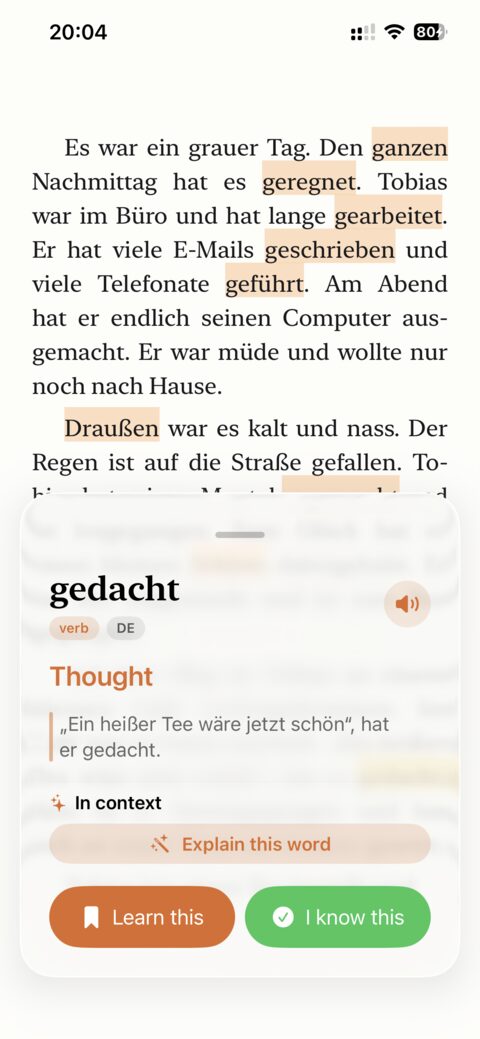
Open the app and pick your target language; you land on a small starter library with a couple of free stories already loaded, so you have something to read in the first minute, not an empty import screen. Tap into a story, and reading feels like reading, full width, no sidebar of lesson controls. Tap any word you don’t know and a short, in-context definition appears without leaving the page or losing your spot in the sentence. Sentence-synced text-to-speech reads along and highlights each sentence as it speaks, so you can listen and read at the same time. Save a word and it goes straight into a built-in spaced repetition system that keeps the original sentence attached, so review later still has context instead of a bare word-and-translation pair. Import your own article or ebook whenever the starter library runs out.
Where oqou is the right tool
oqou is the app to reach for if you already know what you want to read (a novel, a newsletter, articles from a site you follow) and want lookup, listening, and review living on the same screen instead of split across a reader, a dictionary, and a flashcard app. Everything runs on-device, which matters if you’d rather your reading habits and vocabulary lists not sit on someone else’s server. There’s a free plan plus a starter library per language to get you reading on day one.
Where oqou is honestly not enough
It’s iPhone only, so if you’re on Android or want a browser version, oqou isn’t an option yet. Ten languages is a real limitation next to LingQ’s 40+, so if you’re learning something outside that list, look elsewhere. The starter library is a handful of stories per language, not a huge catalog, so you’ll want to bring your own reading material fairly quickly. That’s by design, but there’s no gamified streak system; if points and streaks are what keep you opening an app every day, that’s a genuine reason to pick something else.
Pricing: there’s a free plan, and Premium unlocks the full starter library and unlimited imports for $9.99 a month, or less per month on the 3-month ($24.99) or annual ($79.99) plans.
For a full feature-by-feature breakdown against the category’s biggest name, see oqou vs LingQ.
Try oqou free on the App Store.
Is LingQ still the reading app to beat?
In most ways, yes. LingQ is the veteran of reading-based language learning, and it’s the app most of this category still gets compared to, including by us. It runs on web, iOS, and Android, covers more than 40 languages, and has an enormous library: mini stories, imported podcasts with transcripts, and a large body of community content on top of whatever you bring yourself. If you’ve been doing comprehensible input for a while, LingQ is probably already on your radar: no other app on this list matches its combined language count and content depth.
Trying LingQ for the first time
Sign up, pick a language, and LingQ drops you into its library rather than a blank screen: mini-stories sorted by level, podcasts, and news content are all there immediately. Open one and every word is colored by status, blue for unknown, yellow for in-progress, white for known, so you can see your own progress across an entire text at a glance. Click a word for a translation and it becomes a tracked “LingQ”; click through a few pages and you’ll already have a running known-word count building in the background. Importing your own article works the same way, though finding the import button and understanding the color-coding system both take longer than they should for a first-time user.
Where LingQ still wins
Nothing else here matches LingQ’s combined reach: 40+ languages, a browser extension, native apps on iOS and Android, and enough existing content that you may never need to import anything yourself. The known-word tracking is genuinely motivating once you have a few weeks of data, and the podcast-plus-transcript library is one of the best sources of natural spoken language paired with text that we found anywhere in this roundup.
Where LingQ shows its age
The interface is the most common complaint, and it’s a fair one: the color-coded word system is powerful once you understand it, but the screen gets cluttered fast, and the mobile apps are reported buggy more often than a paid app in 2026 should be. There’s a real learning curve before any of it clicks, which is a rough start for a total beginner. The free tier is also restrictive; you’ll hit a lookup or import limit quickly, and most of the actual value sits behind the subscription.
Price: roughly $12 to $13 a month, cheaper per month if you pay annually. That’s a mid-pack price for what you get, closer to Migaku than to Readlang, but it buys the biggest library and language list in this roundup by a wide margin.
If LingQ’s interface or price is the sticking point, we rounded up direct LingQ alternatives.
Who should use Readlang instead?
Anyone who does most of their reading in a desktop browser and doesn’t want to pay much for it. Readlang is a browser-based reader: install it and you can read almost any webpage in your target language, tap a word for a translation, and save it for later review. It’s one of the cheapest tools in this roundup and one of the best if a laptop, not a phone, is where your reading actually happens. The core idea is simple and it works: you’re not confined to a curated library, you’re reading the news, blogs, or whatever you’d read anyway, just with a translation one tap away.
Setting up Readlang and reading your first page
Install the browser extension, pick your target language, and open literally any page you were already going to read: a news site, a blog, a recipe. Click the Readlang icon to turn on the overlay, then click any word for an instant translation in a small popup, with no navigating away from the page. Click a word again, or a phrase, and you can save it; saved words and phrases collect into Readlang’s own flashcard review, which is basic but functional. There’s also a Kindle-style ebook reader inside Readlang itself if you’d rather read a book than a webpage, though it’s less polished than the extension experience.
Where Readlang earns its low price
You’re reading real material you’d already want to read, which matters more for staying consistent than almost any other feature on this list, and it costs a fraction of LingQ or Migaku for the core experience. Setup takes minutes, and the built-in flashcards, while basic, are still a real review loop rather than nothing. Because Readlang translates through a browser translation engine rather than a curated dictionary, it isn’t limited to a fixed language list the way some other apps here are.
Where Readlang falls short
There’s no polished native mobile app, so if most of your reading happens on your phone rather than a laptop, Readlang will feel like an afterthought. The text-to-speech is noticeably more robotic than newer apps on this list. And the flashcards, while functional, are nowhere near a modern spaced repetition system: no scheduling intelligence, just a simple queue of words you’ve already saved.
Price: there’s a usable free tier, and Premium runs roughly $6 a month, one of the cheapest subscriptions in this entire roundup.
Is Beelinguapp good for beginners?
Yes, probably the best on this list specifically for total beginners who find a blank page intimidating. Beelinguapp’s whole pitch is parallel text: your target-language story sits side by side with a translation, and audio narration highlights each line karaoke-style as it plays. It’s available on iOS and Android and is cheap to use. For beginners who freeze up at a page of unfamiliar words, having the translation right there, one glance away, removes a lot of the anxiety that keeps people from starting at all.
What a first story looks like
Open the app, pick a language pair, and choose a story from the library; folk tales and short news-style pieces are common starting points, sorted loosely by level so you’re not guessing at difficulty. The target-language text sits next to your native-language translation, depending on layout, with a simple toggle to hide one side if you want to test yourself. Hit play and the audio reads the story aloud while highlighting each line as it goes, so you can follow along by ear and eye at once, then slow the narration down if it moves faster than you can track. Glance over when a sentence doesn’t click, then go back to reading target-language-first once the meaning is clear. There’s no tap-to-define dictionary here; the translation is at the sentence level, not the word level, so you won’t get an in-context definition for a single tricky word the way you would in oqou or LingQ.
Where Beelinguapp helps most
The parallel text format is genuinely well suited to complete beginners and lower-intermediate learners who need meaning available at a glance to keep momentum going instead of stalling on the first unfamiliar sentence. The karaoke-style audio highlighting is one of the better implementations of read-and-listen we tested, useful for pronunciation even before you can read comfortably, and the price is low enough that trying it costs almost nothing.
Where Beelinguapp holds you back
You’re mostly locked to its own curated library; there’s no way to import your own articles or books, so once you’ve read through what’s available at your level, you’ve read through it, and the app has no answer for “I want to read this specific thing.” Leaning on the full-sentence translation also becomes a crutch once you’re past beginner level: it’s easy to glance at the translation instead of actually working out the target-language sentence, which slows the exact skill reading practice is supposed to build.
Price: a usable free tier, and Premium runs roughly $4 to $7 a month depending on term, similar to Readlang and one of the more affordable options here. It covers around 15 languages, a solid spread for a curated-content app, though nowhere near LingQ’s count.
What are Du Chinese and Readle best for?
Graded readers, done properly, for a short list of specific languages. Du Chinese (Mandarin) and Readle (currently strongest for Korean, with other languages in its lineup) come from different makers but share the same idea: beautifully leveled graded readers with audio, sorted by difficulty so you always know what’s actually within reach. Where LingQ and oqou hand you a wide-open library or a blank import screen, these apps do the curation for you, which is exactly what a lot of beginner and lower-intermediate learners want instead of one more decision to make.
Opening your first graded reader
Pick your level when you sign up, roughly beginner, intermediate, or advanced, and the app filters its library down to stories that should actually be readable at that level rather than dumping the whole catalog on you. Open a story and you get clean, uncluttered text, a play button for native narration, and word-by-word tap definitions if you get stuck. Finish a story and the app tracks it against your level, nudging you toward slightly harder material over time. There’s no import option and no community content, just a steadily growing shelf of stories written and leveled specifically for learners.
Where the curation pays off
You never have to guess whether something is too hard, which removes a real source of beginner anxiety and burnout, and it means every session actually feels productive instead of a slog through a dictionary. The audio is genuinely well recorded, native speakers at a natural but not rushed pace, and the design is clean and focused on one thing: reading. For Mandarin specifically, Du Chinese is one of the most polished graded-reader experiences we tested in any language.
Where the curation runs out
These are single-language apps: Du Chinese covers Mandarin, and Readle is separate per language, so there’s no one subscription covering multiple languages the way LingQ or oqou does. Neither offers importing your own articles or books, so once you’ve read through your level, you’ve read through it until new stories are added. And if your target language isn’t one of the small set these two apps cover, neither helps you at all, which is worth knowing before you get attached to the format.
Price: freemium, with a subscription per app that varies by language, roughly $10 to $15 a month depending on term and language; check the specific app’s store listing since pricing differs by language and region.
Is Migaku worth it for serious learners?
If you’re intermediate or advanced and already consuming native content daily, probably yes. Migaku is an immersion toolkit built for learners at that stage: it sits on top of Netflix, YouTube, and the wider web, lets you mine sentences straight from what you’re watching, and pushes them into a spaced repetition system with deep Anki integration. It’s the most powerful tool in this roundup and the most complex to set up. This isn’t a “read a story for ten minutes” app; it’s built for people who want a faster way to capture and review what they don’t already know.
Setting up your first mining session
Install the browser extension and connect it to Netflix, YouTube, or a webpage you’re reading; setup involves more steps than anything else on this list, including choosing a dictionary source and configuring your Anki deck. Once it’s running, watching an episode with the extension active pops dual subtitles onto the screen; click a word and a definition appears without pausing playback for long. Click again to add that sentence, word, and a screenshot to your mining queue, then later push cards into an SRS deck, either Migaku’s own or Anki. It’s a genuinely fast workflow once configured, but “once configured” is doing real work in that sentence for a first-time user.
Where Migaku is worth the complexity
For someone already watching shows or reading native content daily, Migaku turns that time into vocabulary capture almost for free, and the sentence-plus-screenshot cards it builds are some of the richest, most memorable flashcards we’ve seen from any tool here. It works across a genuinely wide range of source material, not just books, so if your main input is video and web pages rather than curated readers, nothing else on this list captures it as well.
Where Migaku is overkill
If you’re a beginner, the setup alone will be discouraging before you’ve read or watched anything. It’s desktop and browser-centric; the mobile apps are companions for review, not the main experience, so if you want a phone-first tool, look elsewhere on this list. And its higher tier is the priciest option here by a clear margin, which is hard to justify until you’re actually consuming enough native content to fill the mining queue.
Price: a Standard tier runs roughly $9 a month, with a pricier Early Access tier around $14 to $15 a month for the newest features, covering 10 or more supported languages depending on your target.
What is Language Reactor best for?
Pairing with a reading app, not replacing one. Language Reactor isn’t a reading app at all; it’s dual subtitles and a pop-up dictionary layered onto Netflix and YouTube in your browser. We’re including it because it’s free at its core, excellent at what it does, and it’s the tool most comprehensible-input learners already have installed alongside whatever they use for actual reading. Watching with subtitles is a genuinely different activity from reading text, though, so treat this as a companion, not a substitute for the other six apps here.
Watching your first episode with it on
Install the browser extension, open Netflix or YouTube, and turn it on; a dual-subtitle bar appears under the video, target language on one line, your native language on the next. Click any word in the subtitles and a definition pops up without pausing the video for long, and you can save words as you go. Slow playback down slightly if the dialogue moves faster than you can read, a common first-session adjustment. Saved words can be exported to Anki afterward, though that’s a manual step you have to remember, not something built into a daily habit automatically.
Where it earns a permanent tab
The free tier does exactly one job well, and that job, dual subtitles plus instant lookups on Netflix and YouTube, has a huge, dedicated, actively developed user base behind it. If you already watch shows in your target language, there’s very little reason not to have it installed; the cost of trying it is zero, and it stacks on top of a subscription you probably already have rather than asking for a new one.
Where it stops being a reading app
This is video with subtitles, which trains different skills than reading text at your own pace does, so don’t count it as your reading practice for the day even on days you use it heavily. It’s desktop browser only with no mobile app, so it won’t help with the reading you’d otherwise do on your phone during a commute. And there’s no built-in spaced repetition beyond exporting to Anki yourself, so the review loop only exists if you build it. If you want the fuller picture of input options across reading, video, and listening, see our breakdown of the best comprehensible input apps.
Price: free, with an optional Pro tier around $5 a month, or roughly $28 a year, for extra features; most casual users never need to upgrade, and language coverage follows whatever subtitles Netflix or YouTube already offer for the show you’re watching.
Which reading app should you pick for your situation?
Match the app to where you actually are, not to whichever one is ranked first. Here’s how we’d point people in different situations.
- Total beginner: start with Beelinguapp or Du Chinese/Readle if your language is covered. Parallel text and graded readers remove the guesswork of picking your own material, so you’re not stuck translating word by word through something too hard for you.
- Stuck at an intermediate plateau: this is where reading apps earn their keep. If you can follow a class conversation but real articles or shows still feel like a wall, switch to LingQ or oqou and import content slightly above your comfort level; known-word or review stats show you’re actually progressing.
- Learning Chinese or Japanese: Du Chinese is the strongest graded-reader option, but only for Mandarin. LingQ or Migaku are better starting points for Japanese, since both support it once you’re past absolute beginner level.
- Video-first learner: Migaku if you want to mine what you watch into an SRS, Language Reactor as a free companion for dual subtitles. Neither is a reading app on its own, so pair one with an actual reader like LingQ, Readlang, or oqou.
- Budget zero: Language Reactor is free at its core for the video route. For actual reading, Readlang’s free tier and oqou’s free tier both let you read and look up words without paying, though deeper libraries sit behind premium in most apps here.
- Android user: LingQ, Beelinguapp, Du Chinese/Readle, or Migaku (via browser). oqou is iPhone only and Readlang’s mobile experience is weak, so neither serves you well here.
- iPhone reader who wants one app for everything: oqou. Tap-to-define, your own imported content, sentence-synced read-aloud, and spaced repetition all live on the same reading screen, so you’re not juggling a reader, a dictionary, and a flashcard app separately.
- Coming from a gamified app like Duolingo: every app on this list will feel slower at first, since there are no streaks or points here, just real material. Beelinguapp or Du Chinese/Readle ease that transition best; see our full list of Duolingo alternatives if reading isn’t the only thing you want to replace.
Frequently asked questions
Can you really learn a language just by reading?
Reading alone gets you a long way, especially for vocabulary and grammar intuition, since you absorb patterns from real sentences instead of memorizing rules in isolation. It works best paired with listening and some speaking practice, though, since reading alone won’t train your ear for natural speed or your mouth for pronunciation. Treat reading as your foundation, not your only input.
Do any of these apps work offline?
Most need a connection at least for dictionary lookups and syncing, since definitions and translations are usually fetched rather than bundled with the app. oqou is the exception among the apps we tested closely: lookups run on-device, so previously downloaded content and saved words stay usable without a connection. For the others, check the app’s settings for an offline mode before relying on it during travel.
Which app has a free tier you can actually use, not just a trial?
Language Reactor is free at its core if you’re comfortable watching with subtitles rather than reading text. For actual reading, Readlang’s free tier and oqou’s free tier both let you read and look up words without paying, though deeper libraries sit behind premium in most of these apps.
Is it better to read a lot of easy material or a little of something hard?
More easy material, most of the time. Reading where you understand the large majority of words builds vocabulary and fluency faster than grinding through something so hard you’re translating every other line. Save the harder material for focused, intensive sessions instead.
Can I use more than one of these apps at once?
Yes, and plenty of learners do, since these tools solve different problems. A common combination is a reading app like oqou or LingQ for daily reading, plus Language Reactor or Migaku for video.
What about Kindle plus a dictionary?
It works, and plenty of people learned this way before any of these apps existed. The tradeoff is friction: a built-in dictionary lookup still breaks your reading flow more than a tap-to-define overlay, and none of your looked-up words get captured for review unless you build that system yourself. Kindle also only helps with ebooks, not articles or web pages.
Do I need to know grammar before I start reading?
No, but you need enough basic vocabulary and sentence structure to make reading useful rather than frustrating, usually a few hundred words and the most common verb forms. Parallel text or graded readers exist specifically to bridge that gap, so you can start reading before formal grammar study rather than after it.
How long before reading actually improves my vocabulary?
Most learners in our own testing start noticing a real difference within four to six weeks of consistent daily reading, though “consistent” matters more than the app you pick. A saved-word review loop, like the spaced repetition built into oqou, LingQ, or Migaku, speeds that up more than reading volume alone.