Duolingo is great at getting you to show up and mediocre at getting you past A2. The lessons build a real foundation, translating sentences and matching word pairs works, but the format tops out fast: plenty of people finish the entire tree, keep a 400-day streak alive, and still can’t read a news article or follow a conversation at normal speed. This post sorts nine real alternatives by the actual reason you’re leaving, reading, speaking, grammar, video, vocabulary retention, or budget, with honest pros and cons for each, including the one we make, plus a concrete plan for keeping the habit while you fix the gap.
Why look for a Duolingo alternative?
Most people don’t leave Duolingo because it’s bad. They leave because they hit a specific wall and the app has no answer for it. The most common version: you finish a big chunk of the course, maybe the whole tree, your streak is in the hundreds of days, and you sit down with a book, a podcast, or a native speaker and realize you can’t use much of it. The vocabulary is in there somewhere, but it doesn’t come out fast enough, and full sentences at normal speed sound like noise.
That’s not a motivation problem. It’s a structural one. Duolingo’s exercises are short and isolated by design: translate this sentence, match this pair, fill in this blank. That format is genuinely good at building initial vocabulary and getting you comfortable with basic sentence patterns, which is exactly why it works so well as an on-ramp. It was never built to get you through a real paragraph, a real conversation, or a grammar point that doesn’t reduce to a repeatable pattern. We’ve written a longer breakdown of exactly where that ceiling sits in is Duolingo enough to learn a language, but the short version is: it’s enough to start, not enough to finish.
The other common reasons people go looking: they want an app that explains grammar instead of just showing more examples of it, they want to practice actually speaking or writing and getting corrected, they want to learn from real TV and podcasts instead of app-native dialogue, or they’ve noticed a specific retention problem, they recognize a word in a lesson and lose it a week later, which comes down to how many words you actually need to be fluent and whether your review system actually holds onto them. All of these are legitimate, and all of them point to a different app, not because Duolingo failed, but because no single app does everything well. The rest of this post is organized by which of these is actually your problem.
What does Duolingo actually do well?
Before getting into what to replace it with, it’s worth being straight about this: Duolingo’s habit-formation mechanics are genuinely the best in the category, and it’s free to use at a level that actually works. The streak, the daily reminder, the bite-sized lessons that fit into a commute, the low-stakes gamification, all of it is built by people who understand behavior change better than almost anyone else making language apps. Most learners who try to replace Duolingo with something “more serious” quit within a month, not because the content was worse, but because nothing else made showing up feel as automatic.
It’s also a genuinely fine, cheap on-ramp for absolute beginners. In the first few weeks with a new language, you don’t need nuance, you need volume: basic vocabulary, common sentence patterns, and enough repetition to stop feeling lost. Duolingo does that better than almost anything on this list, and it does it for free.
The honest limit isn’t the app’s quality, it’s its method. Short, isolated, translate-this-sentence exercises are excellent for the first few hundred words and close to useless for the next few thousand, because real language doesn’t arrive in isolated pairs. You can max out every skill tree and still freeze up ordering food, because the app never asked you to process a full sentence at natural speed with the ambiguity real speech has. If Duolingo is still working for you and you’re early on, there’s no reason to replace it yet. Keep reading when it stops being enough on its own.
Which Duolingo alternative fits your goal?
If you already know why you’re leaving, jump straight to that section. If you’re not sure, this is the fastest way to match the problem to the tool. None of these are exclusive: plenty of people run two at once, one for input, one for review.
| I want to… | Top pick | Runner-up |
|---|---|---|
| Read real books, articles, and news in my target language | oqou | LingQ |
| Get speaking and writing practice with real corrections | Busuu | Babbel |
| Learn actual grammar with structured lessons | Babbel | LingoDeer (best for Japanese, Korean, Chinese) |
| Learn from TV shows and movies | Lingopie | Language Reactor |
| Fix a retention problem (I learn words, then forget them) | Anki | oqou’s built-in spaced repetition |
| Spend nothing at all | Language Reactor | Anki (free on desktop and Android) |
| Keep the habit but add real comprehension | Duolingo + oqou | Duolingo + Language Reactor |
Features and prices change. Details were checked in July 2026; confirm on each app’s site before deciding.
A few patterns worth noting before the full entries below. If your target language is European, Babbel is the closest thing to a “Duolingo, but deeper” experience, same general shape, more actual grammar underneath. If you’re past the beginner stage and the real problem is that you can’t read or listen to anything outside a course, that’s an input problem, not a course problem, and most of the apps below solve for input rather than more structured lessons. And if Duolingo feels good to open but doesn’t seem to be building anything durable, that’s usually a review problem hiding behind a motivation problem, which the vocabulary section and the streak-replacement plan below are both built to fix.
What is the best alternative for learning through reading?
Reading is where you actually meet a language as it’s used: full sentences, real ambiguity, vocabulary in the order and density native speakers actually put it in. It’s also the fastest way to find out how much of Duolingo’s vocabulary you can actually recognize outside of a drill. For the full category rundown beyond just these two, see our roundup of the best apps to learn a language by reading.
Disclosure: oqou is our app, so weigh the following accordingly. We’ve tried to be specific about where it falls short rather than skip past it.
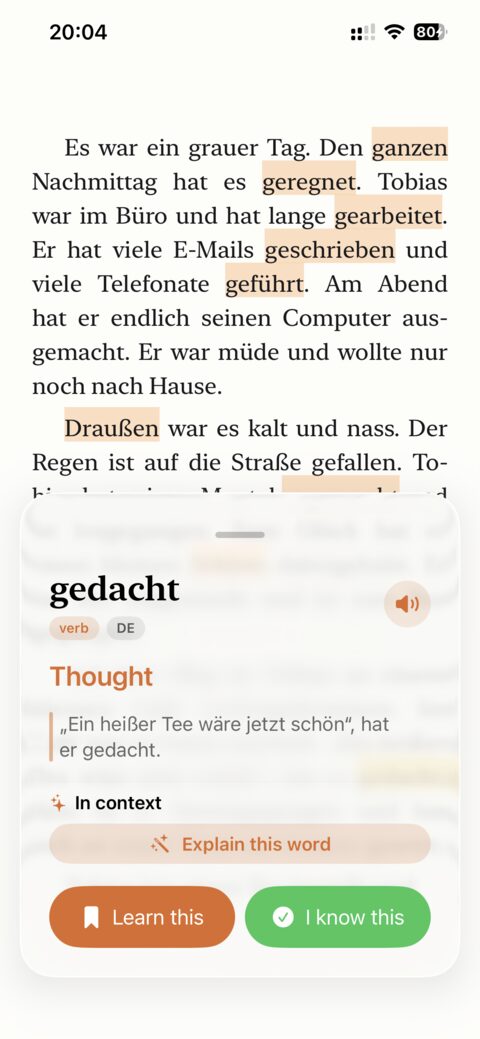
oqou is a reading-first iPhone app built around one loop: open a book, article, or your own imported text, tap any word for an instant, in-context definition without leaving the page, and save it into spaced repetition with one more tap. The original sentence is saved alongside the word, so review later still has context instead of a bare word-and-translation pair. Open the app for the first time and you land on a starter library with a few short stories already loaded per language, so day one is reading, not an empty import screen.
Where oqou earns its place after Duolingo
- Tap any word for an instant definition without leaving the page, no separate dictionary app breaking your flow
- Sentence-synced text-to-speech read-aloud in native-quality voices, highlighting each word as it’s spoken
- Saved words keep their original sentence, so review happens with context intact instead of on a bare flashcard
- Import your own articles, ebooks, or any text once the starter library runs out
- Vocabulary and review data processed on-device
Where oqou is honestly not enough on its own
- iOS only, no Android or web version
- 10 languages (Spanish, French, German, Italian, Portuguese, Japanese, Korean, Chinese, English, Russian), far fewer than LingQ’s 40-plus
- No gamified streaks or points; if the streak itself is what gets you to open an app, keep Duolingo running alongside it rather than expecting oqou to replace that mechanic
Price: Free tier plus a premium subscription at $9.99 a month, $24.99 for 3 months, or $79.99 a year.
Switch if you finished or gave up on Duolingo’s tree and want to spend study time actually reading, on iPhone, in one of the 10 supported languages. Stick with Duolingo a while longer, or look elsewhere, if your language isn’t on that list or you’re not on iPhone.
For a full feature-by-feature breakdown against the category’s biggest name, see oqou vs. LingQ.
Try oqou free on the App Store.
LingQ is the original mainstream reading-and-listening app, built around importing content (text, podcasts with synced transcripts, YouTube, community lessons) and tracking vocabulary as new, recognized, or known as you move through it. Sign up and you land in its library, not a blank screen, mini-stories, podcasts, and news are there immediately, with every word colored by status so you can see progress at a glance.
Where LingQ pulls ahead
- 40-plus supported languages, far more than most competitors including oqou
- A large built-in library: courses, podcasts with synced audio, community-shared lessons
- A mature known-word tracking system that a lot of long-time users find genuinely motivating to watch grow
Where LingQ asks more of you upfront
- The interface is dense and dated; the color-coded word-status system takes real time to learn
- New users commonly report bouncing off the UI before they get comfortable with it
- The free tier is capped at a limited number of saved words, which pushes active users to pay quickly
Price: Roughly $12 to $13 a month, less on an annual plan.
Switch if you want more languages and more built-in content than any single competitor offers, and don’t mind a busier screen to get it. Look elsewhere if the interface is specifically what’s pushing you away rather than the underlying method, in which case our list of LingQ alternatives is a better starting point than this section.
What is the best alternative for speaking practice?
Reading and grammar apps can teach you a language you never actually use out loud. If what you’re missing is real practice speaking or writing and getting told when you’re wrong, not an algorithm scoring your pronunciation against a reference clip, that’s a different problem, and it needs a different kind of app.
Busuu combines structured lessons with a community feature where native speakers review and correct your writing and speaking exercises, real human feedback instead of a best-guess algorithm. Complete a short lesson, then try the paired writing exercise, a few sentences about yourself is a typical first prompt, and submit it to the community review queue.
Where Busuu delivers real feedback
- Real corrections from real native speakers, not just pattern matching
- A freemium model that’s genuinely usable for free, with paid tiers for more depth
- Grammar review built directly into the course structure, not bolted on separately
Where Busuu’s feedback loop is inconsistent
- Community corrections vary in speed and quality since they depend on volunteers, not staff
- Course depth is smaller than Babbel’s for most languages
- The social and community layer isn’t for every learner; some people just want an answer, not a profile
Price: Free tier available; premium subscription for full course access and more corrections.
Switch if you want feedback on your actual output, writing and speaking, not just more input to absorb. Corrections don’t come back instantly, expect to check back later that day or the next, which is the tradeoff for feedback from an actual person instead of an algorithm. Stick with Duolingo, or add Babbel instead, if structured grammar matters more to you right now than getting corrected.
What is the best alternative for grammar and structure?
If what you actually miss is someone explaining why a sentence is built the way it is, not just showing you the translated pair enough times to memorize it, this is the category. It’s the closest thing to Duolingo’s shape, structured, sequential, lesson-based, with real explanation underneath instead of pattern repetition.
Babbel is a subscription course app with structured lessons that actually explain grammar rules, built primarily for European languages, with a curriculum that reads more like a syllabus than a game. Take the placement quiz first if you’ve already got some Duolingo under your belt, then work through one full lesson, vocabulary, a grammar explanation, a short dialogue, before deciding if the pace feels right.
Where Babbel gives you what Duolingo doesn’t
- Real grammar explanations, not just repeated pattern matching
- A solid, well-sequenced curriculum from A1 through B1
- Practical, conversation-oriented vocabulary rather than randomly generated sentence pairs
Where Babbel is still a course, not a fix for everything
- Weaker coverage outside European languages
- Subscription-only, with no meaningful free tier to try before you commit
- Still fairly linear, less flexible than picking your own content to study, so it doesn’t solve a reading or listening gap on its own
Price: roughly $9 to $15 a month depending on plan length; check current pricing on Babbel’s site.
Switch if you want Duolingo’s structure and habit but with real grammar instruction underneath it, especially for Spanish, French, German, Italian, or Portuguese. Look elsewhere if your target language sits outside Europe, LingoDeer below is the stronger pick for Japanese, Korean, or Chinese.
LingoDeer is a structured course app built with Asian languages in mind from the start, rather than adapting a European curriculum, which shows in how carefully it handles grammar that doesn’t map onto English. If you’re a true beginner, start with the script or foundations unit, LingoDeer doesn’t assume you already know kana or hangul the way general apps do, and that unit alone is worth the first session.
Where LingoDeer handles what other apps gloss over
- The strongest structured grammar explanations available for Japanese, Korean, and Chinese
- Careful handling of scripts (kana, hangul, hanzi) alongside the grammar patterns attached to them
- Clear lesson sequencing similar to an actual course, not a shuffled deck of exercises
Where LingoDeer is a narrower tool than it looks
- Less differentiated for European languages, where Babbel is generally the stronger pick
- Subscription cost adds up if you’re also paying for a reading or review tool alongside it
- More rigid and less content-rich than a reading-based app, so it won’t replace real exposure to native content
Price: Subscription; check current pricing on LingoDeer’s site.
Switch if you’re learning Japanese, Korean, or Chinese and want an actual grammar course instead of drills that never explain the underlying pattern. Stick with Duolingo, or try Babbel instead, if your target language is European.
One to name plainly: Rosetta Stone is the legacy immersion-method app, image-matching exercises with no translation, that predates almost everything else on this list. The first lesson matches photos to words with zero translation anywhere on screen, a genuinely interesting way to learn a first few words, though it’s worth timing how long that takes against what a dictionary entry gives you in one second. That gap is the whole tradeoff of the method.
Where Rosetta Stone’s method still holds up
- A genuine no-translation immersion method with a long track record
- Consistent lesson structure and design across every language it offers
- Real brand recognition, and a method some long-time users still swear by
Where Rosetta Stone has fallen behind
- Pricing has stayed at legacy levels while cheaper, more effective modern tools caught up and passed it
- The no-translation method is slower than approaches that just explain the grammar directly
- Feels dated next to apps built in the last five years, both in content and interface
Price: Subscription or lifetime purchase at a price point well above most of the apps on this list; check current pricing on Rosetta Stone’s site.
Switch if the no-translation immersion method is specifically what you’re after and price genuinely doesn’t matter to you. Skip it, honestly, if you’re comparison shopping, most learners get more for less money elsewhere on this list, and it’s worth saying plainly rather than padding out a ninth recommendation that doesn’t hold up.
What is the best alternative for listening and video?
Comprehensible input doesn’t have to mean books. Subtitled shows and movies are one of the most enjoyable ways to get volume exposure to natural speech, spoken at natural speed, with the slang a course strips out. They pair well with a reading habit rather than replacing it. For the broader category, see our list of best comprehensible input apps.
Lingopie is a streaming service built specifically for language learners, with interactive subtitles on real TV shows and movies, so you can click a word mid-episode and get a definition without pausing to open a separate dictionary. Pick a show at or slightly above your level (Lingopie tags difficulty), watch one episode with subtitles on, and click through the words you don’t recognize as they come up rather than pausing constantly.
Where Lingopie makes watching count as studying
- Real, current TV content in the target language, not learner-produced dialogue
- Interactive subtitles make click-to-define genuinely seamless while watching
- Built-in vocabulary saving from whatever you watch, so a show doubles as review material
Where Lingopie is limited by what it can license
- The content library depends heavily on licensing deals and varies noticeably by language
- It’s a subscription on top of whatever streaming services you already pay for
- Passive watching alone won’t get you speaking, it’s an input tool, not a full method
Price: roughly $8 to $15 a month depending on term; check current pricing on Lingopie’s site.
Switch if you want structured, learner-friendly show content with lookup tools built in, rather than rigging up subtitle tools on services you already use. Try Language Reactor instead if budget is the real constraint and you already watch Netflix or YouTube in your target language.
Language Reactor is a free browser extension that adds dual subtitles, target language and native language, plus click-to-define and sentence-saving, on top of Netflix and YouTube. Install it, open a show in your target language, and turn on dual subtitles. Watch five minutes without clicking anything to see how much you actually follow, then rewatch with click-to-define on.
Where Language Reactor is hard to argue with
- Free at its core, with a genuinely useful feature set that would be a paid product almost anywhere else
- Works directly on Netflix and YouTube, so you’re using content you’d likely watch anyway
- Dual subtitles and instant word lookups make it easy to catch what you missed without rewinding constantly
Where Language Reactor stops being enough
- Desktop only, there’s no meaningful mobile experience
- It requires you to already have Netflix or YouTube content in your target language, and quality and quantity vary a lot by language
- No structured course or review system built in, it’s a lookup layer on top of content, not a curriculum
Price: Free; an optional Pro tier runs roughly $5 a month, or about $28 a year.
Switch if you already watch Netflix or YouTube and want immersion without paying for another subscription on top of what you already have. Add a reading app alongside it if you also want structured text practice, since Language Reactor doesn’t cover that at all.
What is the best alternative for building vocabulary?
Some learners don’t have a content problem, they have a forgetting problem. You can recognize a word in a lesson and lose it a week later no matter how much new material you add, because volume doesn’t fix a review system, only a review system does.
Anki is a free, open flashcard app built around one of the most powerful spaced repetition algorithms available, used well beyond language learning (a lot of its reputation was built by medical students memorizing anatomy). Download a well-reviewed shared deck rather than building your own on day one, add 10 to 20 new cards, and run the review queue once. The interface is intentionally bare, the real learning curve is the review intervals, not the app itself.
Where Anki is simply the strongest tool available
- Unmatched spaced-repetition scheduling once you understand how to use it
- Free on desktop and Android, with deep customization for anyone willing to dig in
- Shared decks exist for nearly every language and level, so you don’t have to start from zero
Where Anki demands more than most learners want to give it
- The iOS app costs roughly $25 one-time, which surprises a lot of people used to free or subscription apps
- Building good decks, or finding and vetting good shared ones, is a skill on its own, and a bad deck wastes your time as efficiently as a good one saves it
- No content, reading, or lesson structure at all, it’s purely a review tool with nothing to review until you feed it something
Price: Free on desktop and Android; roughly $25 one-time on iOS.
Switch if you have the discipline to build and maintain your own decks and want the single most powerful review system available, full stop. Look at oqou instead if you’d rather have vocabulary reviewed automatically as a side effect of reading, and it’s worth knowing how many words you actually need to be fluent to see how much review that really adds up to.
What is the best completely free alternative?
If budget is the actual constraint, a few of the apps above are worth separating from the rest. Language Reactor is free at its core, full feature set at no cost, with an optional Pro tier for extras, as long as you already have Netflix or YouTube access in your target language. Anki is free on desktop and Android (the iOS app is the exception, at a roughly $25 one-time cost), and it’s arguably the single most powerful tool here regardless of price. Busuu and oqou both have real free tiers, usable for actual practice, not just a locked demo, though both eventually nudge active users toward a subscription for full depth.
What’s free and stays free
- Language Reactor: full core feature set at no cost, optional Pro tier for extras, as long as you have Netflix or YouTube in your target language
- Anki: free forever on desktop and Android, only the iOS app carries a one-time cost
What’s free until you hit a real wall
- Busuu: usable for free, but deeper course content and unlimited corrections sit behind a subscription
- oqou: usable for free, with a premium tier for full spaced repetition depth and unlimited imports
- LingQ: technically free to start, but the cap on saved words is tight enough that active readers hit it within days
None of this is a reason to avoid the paid apps if they solve your actual problem faster. But if the honest goal is zero dollars spent, Language Reactor paired with Anki on desktop or Android covers input and retention without a subscription anywhere in the stack.
How do you replace the Duolingo streak without losing the habit?
Understand what the streak is actually doing for you
The streak isn’t motivating because of the number. It’s motivating because it removes a decision: you don’t have to decide whether to study today, you just have to not break the chain. That mechanic is genuinely valuable and worth keeping, the mistake is assuming you have to keep it specifically inside Duolingo, or that dropping Duolingo means dropping the habit it built. You can move the same mechanic onto a different, more useful daily action, the habit and the app were never the same thing.
A 14-day plan to build a real input habit
This assumes you’re not deleting Duolingo on day one, cutting the habit cold usually fails. Instead, shrink it and add something next to it.
- Days 1 to 3: Keep your Duolingo lesson exactly as is, however long it currently takes. Add 10 minutes of reading or watching afterward, something easy, a short article, a children’s story, one scene of a show with subtitles. The only goal is doing it three days in a row without deciding whether to.
- Days 4 to 7: Cut Duolingo down to a single quick lesson, 5 minutes, and extend the reading or watching block to 15 to 20 minutes. If you’re reading, tap and save 5 to 10 words a day rather than trying to look up everything. If you’re watching, don’t pause for every unknown word, note it and keep going.
- Days 8 to 11: Add a short review session, 5 minutes, clearing whatever you saved earlier in the week, oqou’s built-in spaced repetition, a Language Reactor saved list, or an Anki deck all work here. This is the step most people skip, and it’s the one that actually fixes the “I learn it then forget it” problem instead of just adding more new material on top of an existing leak.
- Days 12 to 14: Keep all three pieces, a short lesson or none at all, 20 minutes of real input across reading and video, and 5 to 10 minutes of review, and notice which one you’d genuinely miss if you skipped a day. That’s the one that’s become the actual habit. For most people by day 14, it’s the input and review, not the app lesson, which is a sign the streak did its job: it got you into a routine, and the routine outlasted the specific app that started it.
The point isn’t to prove Duolingo wrong. It’s that a 400-day streak and the ability to read a real article are two different achievements, and only one of them requires full sentences, real ambiguity, and vocabulary in the density it actually shows up in outside a course. If you want a fuller sense of what a weekly version of this routine looks like once the 14 days are behind you, our breakdown of comprehensible input across reading, video, and listening covers how to keep it balanced long term.
Frequently asked questions
What’s the best free Duolingo alternative?
Language Reactor is free at its core and genuinely useful if you already watch Netflix or YouTube, adding dual subtitles and click-to-define on top of content you’d watch anyway. Anki is free on desktop and Android (not iOS) and is the most powerful review tool on this list if you’re willing to build or find good decks. Busuu and oqou both have real free tiers for structured lessons and reading practice; check each app’s site for what’s currently included.
What should I use after finishing the Duolingo tree?
It depends on what “finishing the tree” left you unable to do. If you can’t read real content, move to a reading app like oqou or LingQ, since that’s the skill Duolingo’s format doesn’t build. If you can’t follow spoken conversation, add TV-based input with Lingopie or Language Reactor. If you understand things but forget vocabulary fast, add a dedicated review system like Anki or lean on oqou’s built-in spaced repetition. Most people are missing more than one of these, so combining two is common, and reasonable.
Is Babbel better than Duolingo?
For grammar instruction, yes, clearly. Babbel actually explains why a sentence is built the way it is, where Duolingo mostly relies on repeated exposure without much explanation. Duolingo is still better at habit formation and cheaper to start with, free versus subscription-only. Most learners get more out of using Babbel for grammar and something else, reading or TV input, for real-world comprehension, than out of either app alone.
Is Duolingo good for kids?
It’s a reasonable, low-pressure introduction, the gamification that works on adults works even better on kids, and the bite-sized lessons fit short attention spans. It’s not a full curriculum for a child who needs to actually use the language, and the same A2 ceiling applies, so treat it as a starting habit rather than the whole plan if a kid is learning seriously.
Can you get a refund on Super Duolingo?
Refund policies depend on where you subscribed, through the App Store, Google Play, or Duolingo’s own website, and each has its own window and process. In general, Apple and Google both allow refund requests within a limited period through their own account settings, not through Duolingo support. Check the platform you subscribed through first, that’s usually faster than contacting Duolingo directly.
Is it better to learn two languages at once, or focus on one?
For most people, one language at a time gets you further, faster, because vocabulary and grammar from two languages you’re both learning tend to interfere with each other early on. If you’re set on two, pair a familiar-feeling one, same script, related grammar, with a more different one, that causes less confusion than two similar languages at once.
What happens if you quit Duolingo in the middle of a course?
Nothing is lost except the streak, your progress through the tree is saved, and you can pick a lesson back up later. The bigger risk isn’t losing data, it’s losing the daily habit the streak was propping up, which is exactly what the 14-day plan above replaces with something that doesn’t depend on one specific app.
Do these alternatives work for every language?
No, and that’s worth checking before you commit. LingQ has the widest language coverage on this list at over 40. LingoDeer is specifically strong for Japanese, Korean, and Chinese. Babbel and Rosetta Stone lean European. oqou currently supports 10 languages. Check the specific app’s language list against what you’re actually learning before assuming coverage.