Short answer: LingQ is the maximalist choice, a huge library across 40+ languages built up over two decades. oqou is the focused choice, a clean iPhone-only reading app for 10 languages built around your own content. Neither one wins outright. The right pick depends on your platform, your target language, and how much interface you actually want standing between you and the text you’re trying to read. This comparison walks through how each app handles reading day to day, including a same-article test where we imported one real article into both, plus vocabulary review, content libraries, languages, pricing, and everyday usability, before giving you a straight answer for when each app is the one to pick.
oqou or LingQ: which should you choose?
If you want the short version before the details below, here’s who each app is actually built for.
Choose LingQ if
- Your target language isn’t one of oqou’s 10. LingQ’s 40+ language catalog is the single biggest reason to pick it outright.
- You need Android or a desktop and web version, not just an iPhone.
- You want a large built-in library of courses, podcasts, and shared content instead of bringing your own material.
- You like tracking known-word counts and long-term streaks as part of what keeps you motivated.
- You’ve already put years into LingQ and are fluent in its interface. Switching would mean starting your saved-word history over.
Choose oqou if
- You’re on iPhone and don’t need Android or web.
- You mostly want to read your own imported articles, ebooks, or a focused starter library, not browse a catalog.
- LingQ’s interface has ever made you close the app instead of reading.
- You want word lookups, sentence-synced audio, and spaced repetition to feel simple by default, with saved words keeping their original sentence for context.
- On-device privacy for your vocabulary data matters more to you than cross-device syncing.
Here’s how the two apps stack up feature by feature.
| oqou | LingQ | |
|---|---|---|
| Price | Free version + premium: $9.99/month, $24.99/3 months, or $79.99/year | Roughly $12 to $13 a month, cheaper on an annual plan |
| Platforms | iOS only | Web, iOS, Android |
| Languages | 10 (Spanish, French, German, Italian, Portuguese, Japanese, Korean, Chinese, English, Russian) | 40+ |
| Import formats | Articles, ebooks, plus a starter story library per language | Text, podcasts and audio with transcripts, YouTube, community-shared content, courses |
| TTS | Sentence-synced, native-quality read-aloud that highlights as you read | Text-to-speech available, quality varies by language, strongest content is often real recorded audio rather than TTS |
| SRS | Tap-to-save into built-in spaced repetition, keeps the original sentence for context, on-device | Word-status system (new, recognized, known) plus flashcard review of saved LingQs |
| Offline | Not a core focus in the current build | Limited offline support depending on platform |
| Privacy | Vocabulary and review data processed on-device | Cloud-based account and sync |
| Free tier | Real free tier (verify current terms on oqou.app) | Free tier exists but is restrictive, with a capped number of saved LingQs |
Features and prices change. Details were checked in July 2026, confirm on each app’s site before deciding.
Numbers are only half the story though. The bigger difference between these two apps is how they feel to actually use, which is what the next few sections dig into, starting with the reading flow itself.
How do oqou and LingQ approach reading differently?
This is the part that actually matters day to day, because reading-based learning lives or dies on how much friction sits between not knowing a word and knowing it, then getting back to the sentence you were in. oqou and LingQ answer that question in almost opposite ways.
oqou: tap, see, save, keep reading
In oqou, you tap a word and get an instant, in-context definition without leaving the page. There’s no pop-up ad, no navigating to a separate dictionary screen, and no losing your place in the sentence. If you want to keep the word, one more tap saves it into spaced repetition with the sentence it came from still attached. The whole loop, tap the word, see the meaning, save it if it’s useful, keep reading, is designed to take a second or two and then get out of your way. That’s the same principle we go into in more depth in how to learn a language by reading: the less an app interrupts you, the more actual reading you do in a sitting, and volume of reading is most of what drives the gains.
oqou’s honest limitation: less to explore once you outgrow the basics
There isn’t much beyond that loop. No word-status coloring, no community layer, no course structure. For a lot of readers that’s the point, but if you like configuring how you track vocabulary, or want the app to show you a running known-word count, oqou doesn’t offer that view.
LingQ: a mature, configurable status system
LingQ’s lookup flow does the same basic job. Tap a word (it becomes a “LingQ” once saved), see a definition, choose a status of new, recognized, or known, optionally add a note. It works, and longtime users get fast with it. The color-coded status system is also LingQ’s actual pedagogy, not just a UI flourish. It’s built to show you, word by word, how much of a text you already know.
LingQ’s honest limitation: a learning curve that turns some users away
This is also the single most common complaint in LingQ reviews. The interface is dense, the status system takes real time to learn, and the screen can feel busy even for people who’ve used it for years. New users in particular report bouncing off it before they get comfortable. That’s not a knock on the underlying idea, LingQ basically invented mainstream reading-based learning, it’s a cost of two decades of features accumulating in one interface. If you’re the kind of reader who wants the app to disappear so the text can hold your attention, that difference is the whole ballgame. If you don’t mind a busier screen in exchange for more tools on it, it’s a non-issue.
What is it like to import and read the same article in both?
Feature lists only tell you so much, so we picked one real article, a mid-length Spanish news piece covering a current-events topic, the kind of thing an intermediate learner might actually want to read rather than a graded textbook passage, and imported the exact same article into both oqou and LingQ on the same day. We didn’t cherry-pick a text built for demos, and we went in without a strong prediction about which app would come out ahead on this particular article. Here’s what happened at each step, from getting the text into the app to seeing what got saved at the end.
Getting the article into each app
In oqou, importing the article meant pasting the article’s text (or its URL, depending on the source) into the import screen and confirming the language. The app parsed it into readable, paginated text within a few seconds, formatted like a normal reading page rather than a wall of raw text. There was no processing screen to wait through and no separate library step, the article just appeared where our other saved reading was.
LingQ’s import also worked from a URL, and accepted pasted text too. Once submitted, LingQ ran the text through its lesson-creation flow, which is more involved: it lets you set a lesson title, tags, and a source before saving it as a “lesson” in your library. That extra structure is genuinely useful if you’re building out a personal library over time, since everything gets organized and searchable later. It’s also one more screen between finding something to read and actually reading it.
Tapping a word for the first time
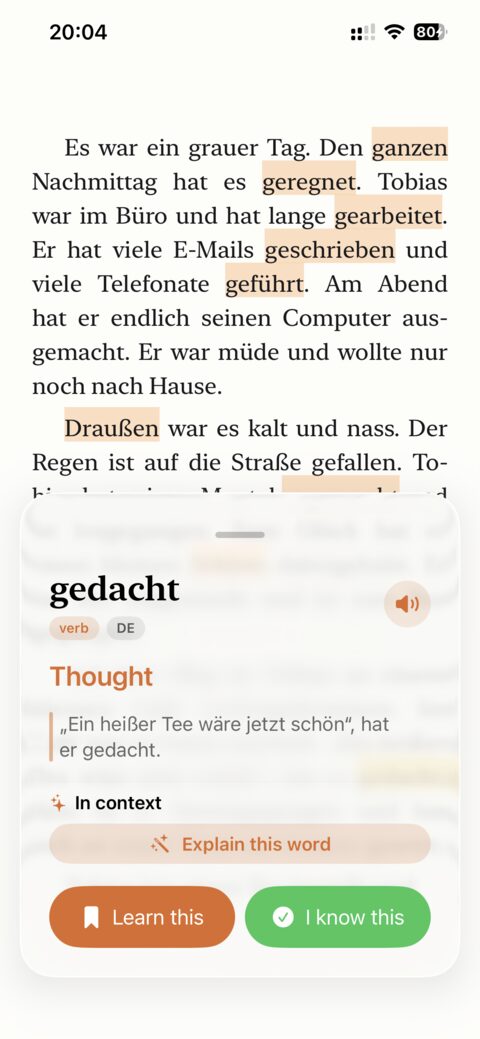
In oqou, tapping an unfamiliar word in the article brought up an inline definition immediately, no reload, no separate panel taking over the screen. The sentence stayed visible and readable while the definition sat alongside it.
In LingQ, tapping a word opens a lookup panel along the bottom or side of the screen (the exact layout depends on platform), showing a dictionary definition and letting you set the word’s status right there. It’s one more decision per word, what status to assign, compared to oqou’s simpler save-or-don’t choice, which is exactly the tradeoff people mean when they say LingQ has more tools but more to think about mid-sentence.
How the dictionaries compare
For the Spanish article, both apps returned usable definitions for common vocabulary without issue. Where they diverged was on less common words and idiomatic phrases. oqou’s in-context definitions leaned toward showing the meaning that fits the actual sentence, which matters a lot for words with multiple senses. LingQ’s dictionary results sometimes showed a broader list of possible meanings pulled from its dictionary sources, which is more information but also more to parse mid-sentence, closer to looking a word up in a real dictionary than getting a single best-fit answer.
What each app actually saves
This was the clearest difference. Saving a word in oqou stored the word alongside the full sentence it came from, so reviewing it later meant seeing the word back in context, not just the word in isolation. Saving a word in LingQ stored the word with its status and the option to add a note, and the surrounding sentence is available if you dig into the LingQ’s detail view, but the review flow itself, flashcard-style, is centered more on the word and its assigned status than on the sentence.
Neither approach is wrong, they’re just built around different theories of what makes a saved word stick. But if the same-article test showed us one thing clearly, it’s that the biggest practical difference between these apps isn’t features on a spec sheet, it’s how many small decisions you have to make per word while you’re trying to just read.
A single article is also a narrow test, worth saying plainly. It doesn’t show you how either app handles a 300-page ebook, a podcast transcript, or a month of daily reading, and it doesn’t capture how the two review systems perform over weeks rather than one sitting. What it does show is the shape of the everyday friction each app adds or removes, which is worth more than a features chart when you’re deciding which app you’ll actually stick with. If you want to see how that friction compounds over a longer stretch, the fairest test is still importing something of your own into both and reading it for a week.
Try oqou free on the App Store.
How does vocabulary tracking and review compare?
LingQ’s system is built around word status. Every word you look up gets marked new, recognized, or known, and the app tracks a running known-word count over time, a number a lot of users find motivating, especially early on when it climbs quickly. Saved LingQs go into flashcard-style review, and it’s a mature system with real configuration underneath if you want to dig into it, review intervals, filtering by status, and more.
oqou skips the status-tracking layer and goes straight to spaced repetition: tap to save a word, and it’s scheduled for review automatically using an SRS algorithm, the same underlying approach we cover in more depth in spaced repetition for vocabulary. The part worth flagging as the meaningful difference: saved words keep their original sentence, not just the word by itself, so review happens with context intact rather than as a bare flashcard. That lines up with the broader idea that words are easier to actually retain when they’re learned in context instead of off a list, which we go into further in vocabulary in context. Review runs on-device in oqou, with no account or cloud sync required to use it.
If a rising known-word count keeps you motivated
LingQ’s system gives you that number directly, and it’s a genuine strength for learners who like watching progress climb. oqou doesn’t try to replicate it. There’s no dashboard showing a lifetime word count.
If you mainly want saved words to come back at the right time
That’s closer to what oqou is built for: less tracking overhead, review that leans on the sentence you actually saved the word from, and fewer decisions per word while you’re mid-article.
Which app has the better content library?
LingQ’s biggest structural advantage is content volume. It has mini-stories built for learners, imported podcasts with synced transcripts and audio, YouTube videos, community-shared lessons, and paid courses, spread across 40+ languages. If you want to open the app and have something to read or listen to without doing any prep yourself, LingQ has more of that, by a wide margin, than any newer app can match. It’s also a reasonable way to explore comprehensible input across formats, not just text, since so much of the library pairs audio with a transcript.
Where LingQ’s library wins
Total volume, format variety across audio, video, and text, and depth in its most popular languages. If your target language has an active LingQ community, you’ll likely find more ready-made content than you could read through in a year.
Where oqou’s bring-your-own approach wins
oqou ships a starter library of stories per language so you’re not staring at a blank screen on day one, but it’s built around importing your own content: articles you find online, ebooks you already want to read, anything in your target language. The premise is that once you’re past a beginner level, you don’t want curated lessons, you want to read the news, novel, or blog post you’d actually read anyway, with fast lookups and painless saving layered on top. That only works well if you already have a source of things to read, or don’t mind spending a few minutes hunting for them.
Neither approach is wrong. It’s a genuine tradeoff: LingQ gives you a library, oqou gives you a fast, low-friction tool for the library you build yourself.
Which languages does each support?
Language coverage is the fastest way to rule one of these apps out, so it’s worth being specific instead of just citing a number.
oqou’s 10 languages
oqou currently supports Spanish, French, German, Italian, Portuguese, Japanese, Korean, Chinese, Russian, and English. Every language gets the same feature set: tap-to-define lookups, sentence-synced TTS, and context-preserving spaced repetition. There’s no tiered experience where some languages get better tools than others.
LingQ’s 40+ languages
LingQ has historically supported 40 or more languages, including several that are genuinely hard to find good learner content for elsewhere, like Ukrainian, Finnish, or Vietnamese. If you’re learning something outside the mainstream ten, LingQ’s language list alone may settle this comparison for you.
Content depth is not equal across LingQ’s languages
Supporting a language and having a deep library in that language are two different things. LingQ’s most popular languages (Spanish, French, Japanese, Chinese, Korean, Russian) have large, mature libraries built up over years. Its less common languages are genuinely supported but with a much thinner catalog, so you’ll likely lean on your own imports or community content sooner than you would in a bigger language.
What do oqou and LingQ cost, and which is better value?
Pricing is the other fast filter, and it’s worth looking at both the sticker price and what you’re actually getting for it.
LingQ pricing
LingQ runs roughly $12 to $13 a month on a monthly plan, less if you commit to an annual plan. Its free tier exists but is capped, a limited number of saved LingQs, which pushes active users toward a paid plan fairly quickly once they’re reading regularly.
oqou pricing
oqou has a free version plus a premium tier: $9.99 a month, $24.99 for 3 months (about $8.33 a month), or $79.99 a year (about $6.67 a month). The free tier is meant to be genuinely usable rather than a capped trial, though as with any app, verify the current terms before assuming what’s included.
| oqou | LingQ | |
|---|---|---|
| Free tier | Usable free version | Capped number of saved LingQs |
| Paid tier | Premium: $9.99/month, $24.99/3 months, or $79.99/year | Roughly $12 to $13/month, or a discounted annual plan |
| Best for | Casual to regular readers on iPhone | Heavy daily users who want the full library |
Features and prices change. Details were checked in July 2026, confirm on each app’s site before deciding.
Which is better value depends on how you’ll use it
For a casual reader who wants to read a few articles a week and review saved words, oqou’s free tier plus an inexpensive premium unlock is likely the better value, since you’re not paying for a huge content library you won’t use. For a daily learner who wants courses, podcasts, and a big catalog to pull from, LingQ’s monthly cost is easier to justify because you’re using more of what you’re paying for. For someone learning multiple languages at once, LingQ’s single subscription covering all 40+ languages can work out cheaper than expected, since it isn’t priced per language. For a total beginner just testing whether reading-based learning works for them at all, oqou’s free tier is the lower-commitment way to find out.
Which app is nicer to use day to day?
Beyond features, there’s a harder-to-quantify question of what it actually feels like to open the app on an ordinary Tuesday.
Where oqou feels lighter
oqou is a newer, smaller app, and it shows in a good way here: fewer screens, fewer settings, less to remember between sessions. There’s no onboarding flow to re-learn if you’ve been away for a few weeks. For a lot of casual readers, that translates directly into actually opening the app more often.
Where LingQ’s maturity shows
LingQ has had 20 years to build out community features, forums, and a large existing user base sharing tips and content. If you like being part of an active learner community around the app itself, that’s a real advantage oqou doesn’t have yet. LingQ’s longer history also means more accumulated bug fixes and edge-case handling in its core import and audio pipelines.
Syncing across devices
LingQ syncs across web, iOS, and Android, so you can start a lesson on your laptop and pick it up on your phone. oqou is iPhone-only, so that question doesn’t come up, everything lives in one place, which is either a non-issue or a dealbreaker depending on whether you ever read on anything other than your phone. If what you actually miss is Duolingo’s streaks and gamified drills rather than a reading app at all, our Duolingo alternatives guide covers that comparison instead.
Getting help when something breaks
LingQ’s support options include a long-running help center and an active community forum where longtime users often answer questions faster than official support does, a natural byproduct of two decades of accumulated users. oqou is small enough that support tends to come more directly from the team building the app, which can mean faster, more personal responses, but without the depth of a large community to search through first. Neither is strictly better, it’s a tradeoff between a bigger safety net and a more direct line.
When is LingQ the better choice?
This deserves a straight answer, not a strawman.
Signs LingQ is the right fit
- Your target language isn’t one of oqou’s 10, this alone is often decisive.
- You need Android or a desktop and browser version.
- You want a large built-in library, courses, podcasts with audio, community content, so you always have something to open without sourcing your own material.
- You’re motivated by known-word statistics and long-term streak tracking as part of how you stay consistent.
- You’ve used LingQ for a while and are already fluent in its interface, the learning curve is a one-time cost, not a recurring one.
A LingQ scenario
Say you’re learning Ukrainian and you want recorded native audio with transcripts, not just text. oqou doesn’t support Ukrainian at all, and even for languages it does support, it isn’t built around audio-plus-transcript content the way LingQ is. In that case this comparison is short: LingQ is the tool built for exactly what you need, and no amount of interface polish elsewhere would make up for the content gap. If LingQ’s library is what draws you in but something about the app itself still isn’t quite right, our LingQ alternatives roundup covers other options built to compete directly with it.
Or say you’re already three years into LingQ, your known-word count is in the tens of thousands, and you’re comfortable with the interface. Rebuilding that history in a different app for a calmer screen would be a bad trade. Sunk cost isn’t always a fallacy, sometimes the accumulated data really is worth more than the friction it took to build.
When is oqou the better choice?
The same honesty applies in the other direction.
Signs oqou is the right fit
- You’re on iPhone and don’t need Android or web.
- You mostly want to read content you bring yourself, articles, ebooks, or lean on a starter library rather than a huge catalog.
- LingQ’s interface has ever made you close the app instead of reading, that’s a real, common reaction, worth taking seriously as a signal about fit, not a personal failing.
- You want the tap-word, see-meaning, save-it loop to feel closer to invisible than to a feature you have to learn.
- On-device privacy for your vocabulary data matters to you.
- You’re fine with 10 languages and a newer, smaller library in exchange for a simpler app.
An oqou scenario
Say you’re an intermediate Spanish learner who already reads news articles and short stories you find online, and what’s actually stopping you from reading more is how annoying it is to look up a word without losing your place. That’s the exact problem oqou is built to solve. You don’t need a bigger library, you already have one, you need the friction between not knowing a word and getting back to reading to get out of your way.
Or say you’ve tried LingQ twice before, made an account, poked around for a week, and quietly stopped opening it both times, not because the content wasn’t there but because the app itself felt like a chore to open. That pattern is common enough to take seriously as a real signal rather than a lack of discipline. oqou is built for exactly that reader: fewer decisions per word, a calmer screen, and a reading loop that’s harder to bounce off of. This comparison only covers two apps, so if neither is quite right, our broader roundup of reading apps covers more ground.
Frequently asked questions
Is oqou cheaper than LingQ?
LingQ runs roughly $12 to $13 a month, less on an annual plan, and that’s a real recurring cost. oqou offers a free version plus a premium tier at $9.99 a month, $24.99 for 3 months, or $79.99 a year, cheaper than LingQ at every term length. Prices checked in July 2026, verify current pricing on each app’s site before deciding.
Can I import ebooks into both?
oqou supports importing your own content, including ebooks and articles, as a core part of how the app is meant to be used. LingQ supports importing text content too, and separately has a strong pipeline for podcasts, YouTube, and other audio-plus-transcript content that goes beyond what oqou offers. If ebook import specifically is your priority, both handle it, if audio-plus-transcript import is the priority, LingQ has the deeper pipeline.
Which is better for Japanese?
Both support Japanese. LingQ has 20 years of Japanese-specific content, courses, podcasts, community lessons, and a larger library to draw on. oqou supports Japanese as one of its 10 languages with the same tap-to-define, sentence-synced TTS, and context-preserving SRS it offers for every language, but with a smaller built-in library, leaning more on imported content and the starter stories. If you want volume and variety of ready-made Japanese content, LingQ has more of it. If you want a simpler reading interface for Japanese text you bring yourself, oqou is the more focused tool.
Can I switch from LingQ to oqou without losing what I paid for?
You can use both at once, there’s nothing stopping you from keeping a LingQ subscription active while trying oqou’s free tier alongside it. If you’re mid-cycle on a LingQ subscription, you generally keep access until the current billing period ends rather than getting a prorated refund, so the cheapest time to switch is right before your renewal date. Check LingQ’s own cancellation terms before you cancel, since billing policies can change.
Can I move my known words or saved LingQs into oqou?
Not automatically. oqou and LingQ don’t currently offer a direct import of saved vocabulary or word-status data between each other, so switching means starting your saved-word history fresh in whichever app you move to. If you’re deep into a LingQ known-word count, that’s worth weighing before switching, the history itself has value even if you stop using the app day to day.
Does either app work offline?
LingQ has limited offline support that depends on platform and content type, some downloaded lessons work offline, live features and fresh content generally don’t. Offline access isn’t a core focus of oqou’s current build either. If offline reading on a flight or a subway commute is a hard requirement, test this specifically in whichever app you’re leaning toward before committing to a subscription.
Which app is better for a total beginner?
LingQ’s beginner-oriented mini-stories and structured courses give a total beginner more of a guided on-ramp before they’re ready to read native content. oqou’s starter story library covers the same early gap in a lighter way, but it’s built with the expectation that you’ll move to your own content fairly quickly. A true beginner with no existing reading habit may get more scaffolding from LingQ, a beginner who already knows what they want to read may prefer oqou from day one. Either way, the first few weeks matter more for building a daily habit than for which app has more features, so weigh how likely you are to actually open each app tomorrow.
Can I use oqou and LingQ at the same time?
Yes, and some learners genuinely do, using LingQ for its content library and oqou for reading their own articles with a faster lookup flow. It’s not the most efficient setup since you’re paying for two subscriptions and splitting your saved-word history across two systems, but there’s no technical reason you can’t run both. If you go this route, it helps to pick one app as your primary review system and treat the other as a content source, rather than trying to keep both vocabulary lists current at once.