For reading, oqou is the strongest comprehensible input app here: real books, articles, and your own imports with tap-to-gloss lookups. For video, Language Reactor wins outright, free dual subtitles and a dictionary layered onto Netflix and YouTube, which also makes it the best free option overall. For true beginners, the honest answer is that no general reader app on this list, oqou included, beats a dedicated graded reader or beginner-oriented input video like Dreaming Spanish. This guide covers the theory behind comprehensible input, which apps actually qualify as CI tools rather than drills wearing a CI label, and how to build a real multi-channel routine around them.
What is comprehensible input, and does it actually work?
Comprehensible input is language you can mostly understand, roughly 95 to 98 percent of the words in a given text or conversation, with just enough new material to stretch you. Stephen Krashen, the linguist behind the idea, called that stretch “i+1”: input one notch above what you already know, understandable from context rather than translated line by line. The claim underneath it is bigger than a study tip: Krashen’s input hypothesis argues that you acquire language largely by understanding real messages, not by memorizing grammar rules and consciously applying them in real time. We go deeper on the mechanism in what comprehensible input actually is, but the short version matters here because it’s the yardstick every app in this guide gets measured against.
What the research actually supports
Decades of classroom and lab research back the general direction of the theory. Learners who get large amounts of understandable reading and listening tend to build vocabulary and grammatical intuition faster than learners restricted to explicit grammar instruction and drills, and extensive reading studies in particular show consistent gains in reading speed, vocabulary retention, and writing quality among learners who read a lot of material at a comfortable comprehension level. The core mechanism, that repeated exposure to words in meaningful context builds usable knowledge better than memorizing an isolated definition, is about as close to settled as language acquisition research gets.
Where the theory gets shakier
Where Krashen’s stronger claims run into trouble is the “input is sufficient” version: the idea that comprehensible input alone, with no explicit grammar study and no output practice, is enough to reach high fluency. Researchers who favor the interaction hypothesis and skill-building models argue that noticing gaps in your own output, getting corrected, and consciously studying tricky structures speed up acquisition in ways pure input doesn’t reliably reach on its own, especially for grammar that doesn’t show up often enough in natural text to be picked up by exposure alone. Meta-analyses of comprehensible-input-based programs tend to show real but moderate effect sizes, not the dramatic outcomes the strongest pitches around the method sometimes imply. Treat comprehensible input as the most efficient way to build the bulk of your vocabulary and grammatical feel, not as a full replacement for every other kind of practice. We come back to that limit later in this guide.
What makes an app genuinely good for comprehensible input?
A real CI app does two things: it hands you real, or honestly graded, target-language content, and it makes that content comprehensible without interrupting the input to teach you a rule. That second part is the dividing line. If the core loop is answer this multiple-choice grammar question, or match the pair, you’re doing structured exercises with a language-learning skin on them, not swimming in input.
The two-part test for a real CI app
Ask two questions about any app that calls itself comprehensible input. First, is the content something a native speaker would actually read, watch, or say, or a purpose-graded version of that, rather than a sentence engineered to isolate one grammar point? Second, does looking something up (a word, a phrase) happen inside the flow of reading or listening, or does it require leaving the content to complete an exercise? An app that fails either test can still be useful, but it isn’t a comprehensible input tool in the way this guide means it.
Why Duolingo, Babbel, Busuu, and Rosetta Stone don’t make the list
That’s why Duolingo, Babbel, Busuu, and Rosetta Stone aren’t ranked below. Not an oversight, a judgment call worth explaining plainly, since all four get recommended under the comprehensible input banner constantly.
- Duolingo runs on short, gamified drills: translate this sentence, tap the matching word, keep the streak alive. That’s exposure to isolated, often unnatural sentences, not connected text you’re reading or listening to because you want to understand it. The streak and XP loop optimizes for daily opens, not comprehension volume. If you still want a structured, Duolingo-style app but a better fit for your goal, we’ve ranked the field in Duolingo alternatives.
- Babbel and Busuu are course apps built around scripted dialogues and explicit grammar explanations. They’re reasonable for building the initial scaffold of vocabulary and structure, but the content exists to teach a point. It isn’t written to communicate a message the way a real article, story, or conversation is, which is the opposite orientation from CI.
- Rosetta Stone teaches through picture-matching without translation, which sounds input-adjacent on the surface. But the sentences are constructed to isolate a single grammar pattern at a time, not written the way a native speaker would actually talk or write. It’s quieter than a flashcard drill, but it’s still a drill.
None of these are bad apps for what they do, and they can genuinely help build the early vocabulary that makes input comprehensible in the first place. But stretching “comprehensible input app” to cover them empties the term of meaning. A CI app’s job is to hand you a real or graded message and get out of the way, not to teach you the message.
Which comprehensible input apps are best overall?
Here’s the honest short answer, before the full breakdown by channel.
- Best for reading input: oqou, for tap-to-gloss reading of real books, articles, and your own imported text on iOS.
- Best for video input: Language Reactor, free at its core, with dual subtitles and a built-in dictionary on Netflix and YouTube.
- Best free option overall: Language Reactor is free at its core, and LingQ’s free tier is usable for light reading before you hit its daily limits.
- Best for absolute beginners: honestly, no app on this list. Graded readers and beginner-friendly comprehensible input video (the Dreaming Spanish style of slow, visual, almost entirely spoken-in-target-language content) beat every general reader app at the very start, oqou included. We cover why, and what to use instead, later in this guide.
One disclosure before we go further: oqou, the app writing this, is a reading-first comprehensible input app. We’ve tried to rank honestly, including saying plainly where oqou isn’t the right tool, because a roundup that only flatters its own product isn’t useful to anyone doing method-aware research.
| App | Input channel | Levels served | Price | Platforms |
|---|---|---|---|---|
| oqou | Reading, plus read-aloud listening | Beginner (with some vocabulary) to advanced | Free tier; premium $9.99/mo, $24.99/3mo, or $79.99/yr | iOS |
| LingQ | Reading, plus import-based listening | Beginner to advanced | Free tier is limited; premium roughly $12 to $13/mo | iOS, Android, web |
| Du Chinese | Graded reading (Mandarin) | True beginner to advanced | Free trial; roughly $10 to $15/mo depending on term | iOS, Android, web |
| Readle | Graded reading (strongest for Korean, more languages in its lineup) | True beginner to intermediate | Free trial; roughly $10 to $15/mo depending on term | iOS, Android |
| Language Reactor | Video, dual subtitles, dictionary | Beginner to advanced | Free; optional Pro tier roughly $5/mo or $28/yr | Desktop browser (Chrome, Edge) |
| Lingopie | Video, curated TV shows | Beginner to advanced | Roughly $8 to $15/mo depending on term | iOS, Android, web |
Features and prices change. Details were checked in July 2026; confirm on each app’s site before deciding.
What are the best apps for input through reading?
Reading is the highest-density input channel: you control the pace, you can look up exactly the word that’s blocking you, and a page of text carries more comprehensible language per minute than almost anything spoken. For more on why, see how to learn a language by reading. Two kinds of reading app show up here: general readers you can point at almost any content (oqou, LingQ), and single-language graded readers built for one specific language from the ground up (Du Chinese, Readle).
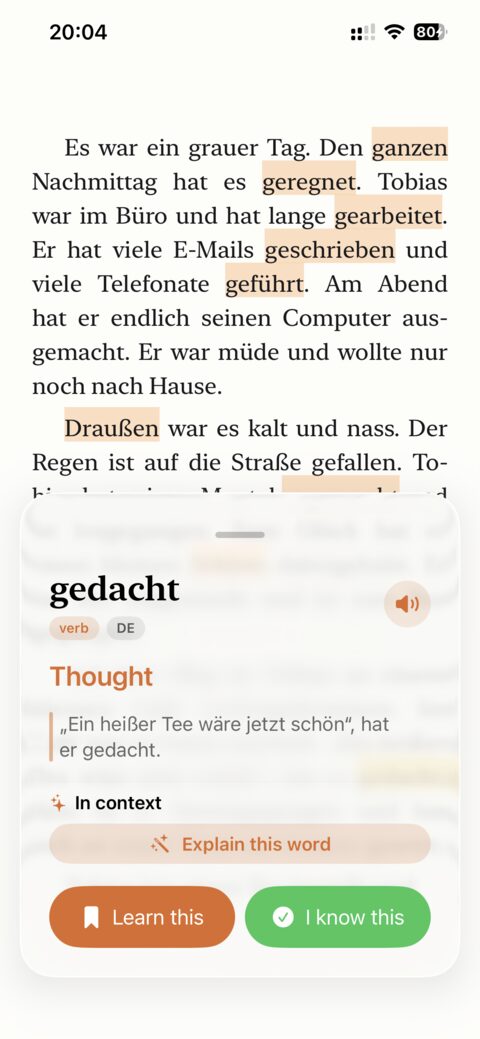
oqou is an iOS app for reading books, articles, and your own imported content in the language you’re learning. Tap any word for an instant, in-context definition without leaving the page, and sentence-synced text-to-speech read-aloud turns the same material into listening input, with the audio highlighting along as it goes. Words you tap and save go into a built-in spaced repetition system that keeps the original sentence attached, and the SRS data stays on-device.
Where oqou is the strongest reading option
oqou’s advantage is speed of use: tapping a word never pulls you out of the sentence, so a session feels like reading with a very fast dictionary rather than reading interrupted by lookups. Importing your own content, a newsletter, a novel you already own, an article a friend sent you, means you’re never limited to a fixed library, and the same imported text becomes listening practice the moment you tap play on the read-aloud. Saved words keep the sentence they came from, so review later reconnects the word to real meaning instead of a bare translation pair. There’s no streak and no daily-open pressure, just the reading.
Where oqou is honestly not enough
oqou is iOS only, so it isn’t an option if you’re on Android or want a browser-based reader. It covers 10 languages, not the 40-plus LingQ supports, and it’s a younger app, so the starter library per language is smaller than an established platform’s, though importing your own content covers most of that gap. Tap-to-gloss reading also needs a base vocabulary to feel smooth: below a few hundred words, you’ll be tapping almost every word, which turns reading into constant interruption instead of comprehension. That’s the beginner concession we keep coming back to in this guide.
Price: free tier available; premium runs $9.99 a month, $24.99 for 3 months, or $79.99 a year.
Best for: reading real books and articles, and importing your own material, once you have some vocabulary to build on. See our broader take in the best apps for learning a language by reading.
Try oqou free on the App Store.
LingQ is the largest reading-and-import platform in this space, with a library across more than 40 languages and the ability to import articles, subtitles, and podcasts to read and look up words in.
Where LingQ wins
LingQ’s content library and language count are unmatched: whatever language you’re learning, there’s a decent chance LingQ already supports it, and the import workflow (pulling in YouTube transcripts, podcasts, articles) is the most mature version of that idea on the market. Its “known words” tracking gives you a running count of vocabulary growth that’s satisfying to watch climb, and the user community shares enough content that a thin official library rarely matters. For a full feature-by-feature comparison against oqou specifically, including a same-article import test, see oqou vs LingQ.
Where LingQ falls short
The interface is dense and can feel cluttered, especially in the first week, and the mobile apps are widely reported as buggier and less polished than the web version, which matters if most of your reading happens on your phone. The free tier caps how many words you can look up and save each month, tightly enough that most serious users hit paid quickly. If the interface or the price is the actual sticking point for you, we rounded up direct LingQ alternatives worth comparing.
Price: free tier is limited; premium runs roughly $12 to $13 a month.
Best for: learners who want the widest possible content library and language selection and don’t mind a rougher interface to get it.
Du Chinese and Readle are graded reading apps built for a small set of specific languages. Du Chinese covers Mandarin, and Readle is currently strongest for Korean with more languages in its lineup. Both write or commission content specifically leveled to a learner’s stage, rather than repurposing native content or importing whatever you bring.
Where Du Chinese and Readle are the purest CI option
Because the content is written or adapted for a specific level rather than filtered from native material, Du Chinese and Readle get closer to Krashen’s original i+1 target than any general reader app can, since a human editor is deliberately controlling difficulty rather than you discovering it by trial and error. Audio narration ships with every story, and the level progression is explicit, so you always know roughly how hard the next lesson is before you open it.
Where their limits show
Both apps cover a narrow set of languages, so neither extends to every language you might be learning, and neither lets you import your own content: you’re limited to their library, full stop. Total content volume is smaller than a general reader app with the whole internet to pull from, which means committed learners eventually read through most of what’s available at their level.
Price: both offer a free trial; subscriptions run roughly $10 to $15 a month depending on the plan and language.
Best for: learners of Chinese or Korean who want the purest form of graded comprehensible input available in app form, especially in the early-to-intermediate stage.
What are the best apps for input through video?
Video adds tone, pacing, and cultural context that text alone doesn’t carry, and it’s a natural complement to reading rather than a replacement for it. The two tools worth knowing here take opposite approaches: one is a free power tool you bolt onto services you already use, the other is a paid, curated app built to be the whole experience.
Language Reactor is a free browser extension that overlays dual subtitles (target language and your native language) and a click-to-define dictionary onto Netflix and YouTube.
Where Language Reactor is the best deal in this whole roundup
Free at its core and extremely capable for the price: dual subtitles let you check comprehension instantly without pausing to search elsewhere, and it works with two of the largest video libraries in existence, so content selection is effectively unlimited. A saved-words feature builds vocabulary lists from what you actually watch, and because it sits inside Netflix and YouTube directly, there’s no separate content-hunting step to slow you down.
Where Language Reactor’s format works against it
Desktop browser only, no dedicated mobile app, so it doesn’t fit a lean-back, on-the-couch viewing habit, and setup plus subtitle quality depend on what’s available for a given show or channel, which varies more than you’d expect. The interface, while functional, looks more like a power-user tool than a polished consumer app, and that learning curve turns some casual viewers away before they get the payoff.
Price: free; an optional Pro tier with extra features runs roughly $5 a month, or about $28 a year.
Best for: learners who already watch Netflix or YouTube and want a free, powerful way to turn that viewing into deliberate comprehensible input, at a desktop or laptop.
Lingopie is a subscription app with a curated catalog of native TV shows and films across several languages, paired with interactive, clickable subtitles.
Where Lingopie is the better everyday app
A real mobile and TV-friendly app, unlike Language Reactor’s browser-only setup, and the curated show selection removes the “what do I watch” decision that stalls a lot of video-based routines before they start. Clickable subtitles support quick lookups without breaking viewing flow, and the whole experience is built for a lean-back, entertainment-first learning style rather than a power-user workflow.
Where Lingopie’s catalog limits you
The show catalog is curated and therefore limited compared to Netflix or YouTube’s full libraries, and depth varies a lot by language: some are far better served than others. It’s also a paid subscription with no meaningfully free tier, so there’s no free way to test whether the catalog for your specific language is deep enough before you commit.
Price: roughly $8 to $15 a month depending on term, cheapest on an annual plan.
Best for: learners who want a dedicated, curated video app rather than assembling their own setup on top of Netflix or YouTube.
What are the best apps for input through listening?
There isn’t a standout dedicated listening-only CI app worth a full entry here, and that’s fine, because the most effective listening input usually comes from turning reading or video material into audio rather than starting from an audio-first product.
Turning what you already read or watch into listening practice
Two practical routes cover most of what a dedicated listening app would offer. First, pairing native-language podcasts with LingQ’s import feature, so you can look up unfamiliar words from a transcript instead of guessing at fast, unfamiliar audio. Second, using oqou’s sentence-synced read-aloud to listen to the same book or article you’re already reading, with the audio highlighting the text as it plays, so listening becomes a layer on top of reading rather than a separate habit you have to build from zero. Either approach makes listening comprehensible instead of a wall of unfamiliar sound, which is the same principle behind language immersion at home: comprehensible exposure across channels, not just one.
Where a dedicated listening app would still help
What neither route replaces is audio-first content with no transcript at all: real conversation between native speakers, talk radio, or a podcast episode with no accompanying text. If your goal includes following native speech with zero visual support, you’ll eventually need practice without a transcript to lean on, since the transcript itself becomes a partial crutch the same way full-sentence translations can. Treat transcript-supported listening as the on-ramp, not the destination.
How do you know if content is at the right level?
The comprehension math behind comprehensible input, that 95 to 98 percent figure from earlier, isn’t just theory trivia, it’s a practical test you can run on almost anything before committing to it.
The percentage-of-unknown-words test
Pick a random paragraph or a minute of audio and count how many words or phrases genuinely stop you, not ones you could guess from context, ones that actually block meaning. If it’s roughly 1 in 20 to 1 in 50 words (2 to 5 percent), you’re in the i+1 zone: challenging enough to grow, not so dense that you’re translating instead of reading. If you’re stopping on 1 in 10 words or more, the content is too hard right now, not permanently, just right now.
The follow-the-plot test
For video and audio in particular, ask whether you could describe what just happened to someone else without pausing or rewinding. If you’re pausing every 15 to 30 seconds to figure out what’s going on, the content is below the comprehension threshold for input to do its job, even if you’re “understanding” it technically through effort. Content at the right level lets you follow along in real time, missing detail here and there without losing the thread.
Adjusting per channel
Reading is the most forgiving channel to misjudge, since you set the pace yourself and a tap-to-define app like oqou or LingQ turns an occasional hard word into a two-second detour rather than a dead stop. Video and audio are less forgiving, because the pace is set for you, so err toward content that feels slightly too easy rather than slightly too hard, especially early on. As a rough check, if you’re re-reading the same sentence more than once per paragraph, or rewinding a video more than once or twice a minute, drop down a level rather than pushing through on willpower.
How do you build a weekly input routine across channels?
A routine that mixes channels beats a routine that maxes out one, since reading, video, and listening reinforce each other and reduce the fatigue of doing the same activity every day. Here are three sample weeks, adjusted for level; treat the time totals as a floor, not a ceiling.
A beginner week
Beginner here means true beginner to a few hundred words, before general reader apps pay off.
- Monday, Wednesday, Friday: 20 to 30 minutes of beginner-oriented comprehensible input video (Dreaming Spanish style content, or an equivalent for your language).
- Tuesday, Thursday: 20 to 30 minutes of a graded reader (Du Chinese or Readle if your language is covered, or a print graded series otherwise), audio on if the app offers it.
- Saturday: a longer 45-minute session, whichever of the two you’re enjoying more that week.
- Sunday: off, or a rewatch of something from earlier in the week; repetition at this stage is a feature, not a waste of time.
The goal is volume of understandable input, not speed. Don’t force real news articles or native podcasts yet, they’ll mostly be noise.
An intermediate week
Intermediate here means you’re consistently recognizing common words without translating them line by line, and occasional lookups feel occasional rather than constant.
- Monday, Thursday: 20 minutes reading in a tap-to-gloss app like oqou or LingQ, real articles or short stories, not graded material.
- Tuesday: 30 minutes of video with dual subtitles (Language Reactor) or a curated show (Lingopie).
- Wednesday: 15 to 20 minutes listening to the same piece you read Monday, via read-aloud or an imported podcast transcript.
- Friday: 20 minutes reading, new material.
- Weekend: one longer video session (an episode or two) plus a short reading session, whichever order you prefer.
This is roughly where the transition from graded to real content happens. Our guide to learning Spanish by reading walks through that transition in more detail for that language specifically, and the same shape applies to most languages.
An advanced week
Advanced here means the input should feel challenging but followable, missing the odd word or idiom without losing the thread.
- Daily: 20 to 30 minutes of reading, real books, articles, or long-form content in a reader app, no simplification.
- 3 to 4 times a week: 30-plus minutes of native video or podcasts, subtitles optional rather than required.
- 2 to 3 times a week: listening to reading material you’ve already covered, to build speed and catch words you recognized on the page but wouldn’t catch by ear alone.
- Ongoing: let saved vocabulary from reading feed a spaced repetition review, 5 to 10 minutes a day, so words you’ve met don’t quietly slip away.
At this level the channels blur together more than they’re separate habits, which is roughly the point: input is input, whichever door it comes through.
Can you learn a language with input alone?
What input alone gets you
Mostly yes, for the receptive side: comprehension, vocabulary breadth, and a grammatical “feel” for what sounds right, built the same way input built your first language, through volume and pattern recognition rather than memorized rules. Learners who do large amounts of comprehensible reading and listening consistently outperform learners who rely mainly on textbook drills when it comes to reading speed, vocabulary retention, and picking up natural phrasing that a grammar rule wouldn’t teach you anyway.
What it doesn’t: output and grammar precision
Input alone doesn’t reliably build speaking or writing fluency, since producing language is a different skill from recognizing it, and it isn’t trained just by absorbing more input. You can understand a grammar pattern perfectly in text for months and still get it wrong the first ten times you try to produce it yourself under pressure, because production requires retrieval speed that comprehension doesn’t. Low-frequency grammar (irregular subjunctive forms, case endings that only show up occasionally, formal register you rarely encounter in casual native content) also tends to need explicit study or correction to lock in, since it doesn’t appear often enough in natural input to be absorbed through exposure alone. The honest routine for most learners: input for the bulk of vocabulary and grammatical intuition, plus deliberate speaking or writing practice and some explicit grammar reference once you’re past the beginner stage, not instead of input, alongside it.
Frequently asked questions
Is Duolingo comprehensible input?
Not really. Duolingo’s core loop is short, gamified drills built around isolated sentences, translation exercises, and matching games, which is structured practice rather than reading or listening to understand a real message. It can help build early vocabulary that makes later input more comprehensible, but the app itself isn’t designed to deliver comprehensible input the way a graded reader, a reader app, or a CI-style video does.
What’s the best comprehensible input app for Spanish?
It depends on your level. A true beginner is better served by graded readers or Dreaming Spanish style beginner video than by any app on this list, and once you have a base vocabulary, a reading-first app like oqou (tap-to-gloss reading of real Spanish content, with read-aloud for listening) or LingQ (larger library, rougher interface) are the strongest reading options, with Language Reactor the strongest free option for turning Spanish Netflix or YouTube into comprehensible video input. See our Spanish-specific reading guide for a fuller routine.
Do I need to understand every word for input to count as comprehensible?
No, and expecting that is a common way learners talk themselves out of reading or watching real content too early. The target is roughly 95 to 98 percent comprehension, not 100 percent; the small gap of unfamiliar words is where the actual learning happens, as long as the surrounding context is strong enough to carry the meaning.
Is comprehensible input enough on its own, or do I still need a textbook?
Comprehensible input can carry most of your vocabulary and grammatical intuition, but a textbook or grammar reference still earns its place for low-frequency structures that don’t show up often enough in natural content to be absorbed by exposure alone. Use one as an occasional reference, not the center of your routine.
How much comprehensible input do I need per day?
Consistency matters more than volume: 20 to 30 minutes a day of genuinely comprehensible material beats an hour once a week, since acquisition depends on repeated, spaced exposure rather than a single long session. More is better once the habit is solid, but a small daily habit outperforms an ambitious routine you abandon after a week.
Can content made for native children, kids’ shows and picture books, count as comprehensible input for adults?
Yes, and it’s an underrated resource for adult beginners specifically because it’s built to be understood by someone with a small vocabulary, using repetition, visuals, and simple sentence structure. The subject matter can feel juvenile, but the comprehension math works in your favor, which matters more early on than the content feeling age-appropriate.
Is passive listening, audio playing in the background while you do something else, comprehensible input?
Mostly not, at least not the kind that drives acquisition. Krashen’s model depends on attention and understanding, and background audio you’re not actively parsing is closer to unfamiliar noise than input, even if the language is technically playing. It can help with rhythm and sound familiarity, but treat it as a minor supplement, not a substitute for focused, understandable reading or listening.